What is GitMCP?
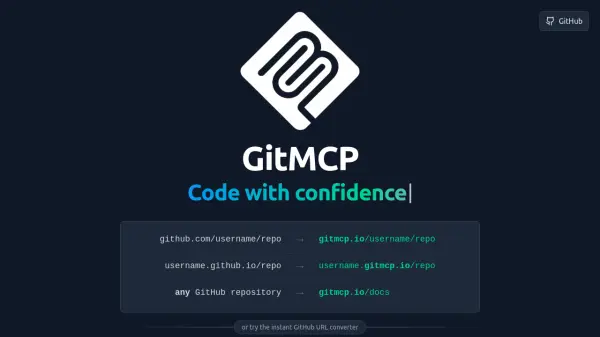
GitMCP offers a straightforward solution for developers to enhance AI coding assistants with contextual understanding of GitHub projects. By altering a GitHub repository URL (changing github.com or github.io to gitmcp.io), users instantly generate a dedicated Model Context Protocol (MCP) server. This server grants AI tools access to comprehend the repository's code, including files like llms.txt, llms-full.txt, and readme.md.
This process requires no complex configuration, providing universal access for any public GitHub repository and GitHub Pages. The primary benefit is that AI assistants achieve a deeper understanding of the code, leading to more accurate, relevant, and helpful responses during development. GitMCP is designed for seamless integration with popular MCP-compatible AI tools, aiming to improve the overall AI-assisted coding experience for developers.
Features
- Instant MCP Server Creation: Simply change the domain from github.com or github.io to gitmcp.io to generate an MCP server.
- Enhanced Code Understanding for AI: AI assistants gain deep context of the code repository, reading llms.txt, llms-full.txt, readme.md and more.
- No Complex Configuration: Easy setup by pointing to a GitHub repository and connecting AI tools.
- Universal Access: Works seamlessly with any public GitHub repository and GitHub Pages.
- Broad Compatibility: Compatible with popular MCP-compatible AI tools like Claude, Cursor, Windsurf, VSCode, Cline, and Highlight AI.
Use Cases
- Improving AI-assisted code generation by providing context from a specific GitHub repository.
- Enhancing AI-powered code analysis and debugging with repository-specific knowledge.
- Enabling AI tools to understand and answer questions about a project's documentation hosted on GitHub Pages.
- Streamlining AI integration into development workflows by providing direct access to repository context.
- Allowing AI assistants to provide more accurate suggestions and completions based on the existing codebase.
FAQs
-
How does GitMCP improve AI coding assistance?
GitMCP provides AI assistants with a deep context of the code repository by allowing them to read files like llms.txt, llms-full.txt, and readme.md, making their responses more accurate and relevant. -
Is GitMCP difficult to set up?
No, GitMCP offers instant setup without complex configuration. You just need to modify the GitHub repository URL and configure your AI tool to use the GitMCP URL as a custom MCP server. -
What kind of GitHub repositories does GitMCP work with?
GitMCP works seamlessly with any public GitHub repository and GitHub Pages. -
Which AI tools are compatible with GitMCP?
GitMCP is compatible with popular MCP-compatible AI tools such as Claude, Cursor, Windsurf, VSCode, Cline, and Highlight AI.