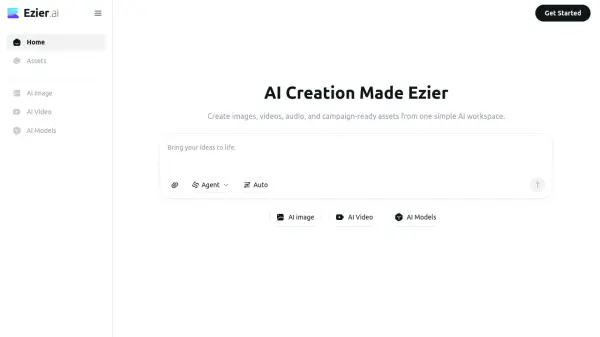
What is Ezier.ai?
Ezier.ai is a comprehensive AI creation workspace designed to streamline the entire creative production process. It brings together image generation, video production, audio creation, and campaign-ready asset development under one roof, eliminating the need for multiple subscriptions or platforms. With access to over 20 top-tier AI models such as GPT-Image-2, Nano Banana Pro, Qwen Image, Veo, Kling, Seedance, and Hailuo, users can select the most suitable model based on their specific needs, whether that involves text rendering, product detail, motion quality, or visual style.
The platform is built for multi-step creative workflows, where results from one step seamlessly become the input for the next. Ezier features over 13 AI image tools including text-to-image, image-to-image, background remover, object remover, image upscaler, and AI logo generator, alongside a full suite of AI video tools such as text-to-video, lip sync, video extender, and video upscaler. An Agent and Auto mode further simplifies the process by intelligently routing prompts to the best tools and models when users are unsure where to start. A credit-based system makes it more cost-effective than maintaining separate platform subscriptions, allowing creators, marketers, e-commerce teams, and designers to test and refine assets before committing resources.
Features
- Multi-Model Access: Choose from 20+ leading AI image and video models including GPT-Image-2, Nano Banana Pro, Qwen Image, Veo, Kling, and Hailuo.
- AI Image Suite: 13+ image tools covering text-to-image, image-to-image, background removal, object removal, upscaling, enhancement, and logo generation.
- AI Video Studio: Full video creation tools including text-to-video, image-to-video, lip sync, video extension, video upscaling, and video enhancement.
- Agent & Auto Mode: Intelligently routes prompts to the best tools and models when the user is unsure where to start.
- Credit-Based Pricing: Pay per use with credits, enabling cost-effective testing across multiple models and tools before committing to final assets.
- Consistent Multi-Step Workflows: Keeps prompts, references, model choices, edits, and generated assets together so one idea can become multiple asset types.
- Product & E-commerce Tools: Dedicated tools for product picture generation, background removal, and animated product demos.
- Social Media Asset Creation: Generate post graphics, captions, and social-ready visuals in one workspace.
Use Cases
- Creating product images and polished product scenes for e-commerce listings
- Generating social media post graphics and matching captions
- Producing ad clips and campaign-ready video assets from text or images
- Designing logos, brand marks, and visual identities quickly
- Animating still product images into short demo or launch videos
- Removing backgrounds or objects from images for clean commercial visuals
- Upscaling and enhancing images and videos for higher-resolution delivery
- Generating lip-synced videos for dubbed or localized content
- Drafting poster concepts and reference-led image directions for design projects
- Creating AI wallpapers and thumbnails for digital content
How It Works
Describe Your Creative Goal
Enter a prompt, upload a reference image, or describe your campaign idea in the Ezier workspace to get started.
Choose a Tool or Let Agent/Auto Decide
Select a specific AI image or video tool manually, or use the Agent and Auto mode to let Ezier intelligently route your prompt to the best workflow and model.
Select Your AI Model
Pick from 20+ leading AI models such as GPT-Image-2, Nano Banana Pro, Kling, or Veo based on your needs, whether it is text rendering, product detail, motion quality, or speed.
Generate and Review Results
Ezier generates your image, video, or audio asset. Review the output and compare results across different models or directions.
Refine and Polish
Use follow-up tools such as Background Remover, Object Remover, Upscaler, Lip Sync AI, or Video Extender to refine and finalize your asset without starting over.
FAQs
-
What is Ezier.AI?
Ezier.AI is an AI creation workspace for turning prompts, reference images, and rough campaign ideas into usable assets. It brings generation, editing, enhancement, model choice, and follow-up refinement into one place, so a draft can move from first idea to a usable image, video, audio, or campaign asset. -
Is Ezier only an AI image generator?
No. Ezier includes image tools for text-to-image, image-to-image, background removal, object removal, text removal, upscaling, enhancement, and unblurring. It also supports video work such as text-to-video, image-to-video, lip sync, video extension, video upscaling, video enhancement, and unblurring. -
How do Ezier credits work?
Ezier credits are used for generation, editing, and enhancement inside the workspace. Instead of opening separate paid plans to test different models or tools, you use credits based on the model or tool you choose. Heavier models and more advanced outputs may cost more credits than simple edits. -
Who should use Ezier?
Ezier is useful for creators, marketers, e-commerce teams, designers, founders, and small teams that need visual output often. Common jobs include product scenes, listing images, social posts, ad concepts, thumbnails, logo drafts, wallpapers, short videos, lip-synced clips, and campaign variations. -
Does Ezier support leading AI models?
Yes. Ezier includes image model options such as GPT Image 2, Nano Banana 2, Nano Banana Pro, Qwen Image, and Wan Image, plus video model options such as Veo 3.1, Kling 3.0, Seedance, and Hailuo. Ezier also follows new model releases and adds useful options quickly.