What is Ez Img Editor?
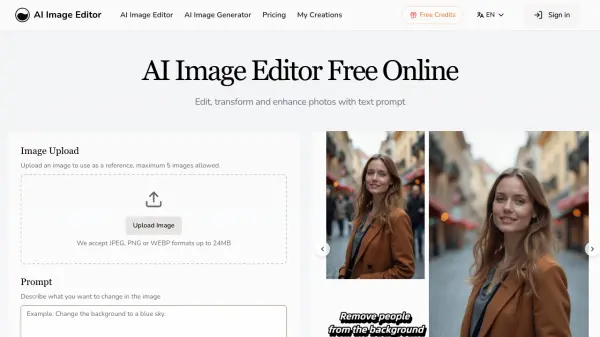
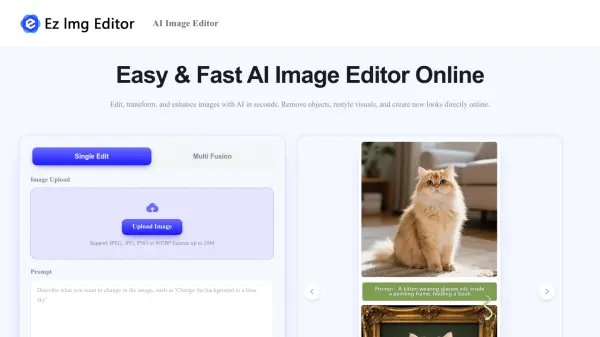
Ez Img Editor is an all-in-one AI image editing platform that makes professional-grade photo editing accessible to everyone. It offers two core editing modes: Single Image Editing, where users can remove unwanted objects, adjust colors and lighting, transform styles, and refine portrait details via simple text prompts; and Multi-Image Blending, which allows users to merge elements, transfer styles, and generate unique creative compositions from multiple photos. The platform is entirely browser-based, requiring no software installation, and provides free daily credits that automatically refresh so users can edit images regularly without cost.
Ez Img Editor is built for a wide range of professionals and creators, including e-commerce store owners who need clean product photos, social media influencers looking to enhance their visual brand, interior designers wanting to visualize room layouts, photographers seeking cinematic atmosphere edits, and HR professionals needing polished LinkedIn headshots. The tool prioritizes user privacy by processing images securely without using them for AI model training, and automatically deletes files after processing. Edited images can be used for commercial purposes, making it a practical solution for business and marketing workflows.
Features
- Single Image Editing: Upload one image and use text prompts to remove objects, adjust colors, change styles, and refine portrait details.
- Multi-Image Blending: Combine elements, transfer styles, and create custom compositions from multiple uploaded photos.
- Object Remover: Instantly remove photobombers, watermarks, clutter, or any unwanted objects with AI-powered fill.
- Background Changer: Replace backgrounds with professional scenes suitable for product photos, marketing, and social media.
- AI Headshot Generator: Transform casual selfies into polished, studio-quality professional headshots.
- Free Daily Credits: Access AI editing tools daily without payment, with credits automatically refreshing every day.
- Privacy Protection: Uploaded images are processed securely, not used for AI training, and deleted automatically after processing.
- Text Prompt Editing: Direct AI edits using natural language instructions for intuitive and precise control.
Use Cases
- Creating professional product photos for e-commerce listings by replacing backgrounds and removing distractions
- Generating polished LinkedIn or resume headshots from everyday selfies
- Enhancing social media content with AI filters and style transformations
- Visualizing interior design concepts by editing room layouts and furniture arrangements
- Transforming photo atmospheres with cinematic lighting and golden-hour effects
- Removing unwanted objects such as trash bins, signs, or photobombers from images
- Blending elements from multiple photos to create unique creative visuals
- Producing marketing and branding visuals without advanced design skills
How It Works
Upload Your Image(s)
Upload a single image for direct editing, or upload multiple images to blend their styles and elements together.
Choose Your Editing Mode
Select from Single Image Editing for targeted adjustments, or Multi-Image Blending to combine visuals from several photos.
Describe Your Edit via Text Prompt
Enter a simple text instruction telling the AI what you want to change, such as removing an object, swapping the background, or transforming the style.
AI Processes and Generates the Result
Ez Img Editor's AI interprets your prompt and applies the requested edits, preserving natural lighting, textures, and image quality.
Download and Use Your Edited Image
Review the result and download the edited image for use in e-commerce, social media, marketing, or any other commercial or personal project.
FAQs
-
Does Ez Img Editor offer free usage?
Yes. Ez Img Editor provides free daily credits that automatically refresh every day, allowing regular image editing without payment. Upgrades are available for more usage or faster processing. -
Are uploaded images kept private?
Yes. Images are processed securely, are not used to train AI models, and are automatically deleted after processing to protect user privacy. -
Can images edited with Ez Img Editor be used commercially?
Yes. Edited images can generally be used for business, marketing, e-commerce, social media, and other commercial purposes, provided you have the rights to the original content uploaded. -
Will the AI edits look natural?
In most cases, yes. Ez Img Editor is designed to preserve realistic lighting, textures, and image details. Using clear, high-quality source images produces the best results. -
Will new features be added to Ez Img Editor?
Yes. The platform is regularly updated with new AI models, editing tools, and workflow improvements based on user feedback and the latest AI technology.