What is Digital WarRoom?
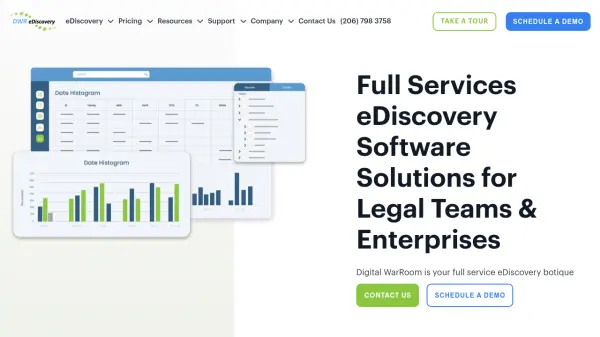
Digital WarRoom is a comprehensive eDiscovery software platform designed to streamline electronic discovery processes for legal teams and enterprises. The platform offers automated document processing that extracts metadata and indexes content for efficient searching, along with advanced filtering and keyword search capabilities to narrow down document subsets. Specialized features include Who to Whom email analysis, email thread visualization, and date histogram tools to help legal professionals identify relevant correspondence and patterns in large datasets.
The software provides multiple deployment options including on-premise desktop applications and cloud-based hosted solutions, all with transparent pricing and no hidden processing fees. Digital WarRoom emphasizes security with encryption, two-factor authentication, and no third-party data access, while offering included training and support to help users become proficient in eDiscovery workflows.
Features
- Automated Document Processing: Extracts metadata and indexes all document content for searchable review
- Advanced Filtering & Keyword Searching: Allows multiple filter criteria combined with keywords to narrow document subsets
- Who to Whom Analysis: Provides heat map visualization of email correspondence patterns based on keyword hits
- Email Thread Visualizer: Tracks email threads across multiple users with visual representation
- Date Histogram: Enables filtering and analysis of documents based on temporal patterns
Use Cases
- Legal document review for litigation cases
- Electronic discovery for corporate investigations
- Email correspondence analysis in legal matters
- Digital evidence management for law firms
- Compliance document review and analysis
FAQs
-
What are the main differences between the hosted and on-premise versions?
Hosted environments offer optimized processing speeds, no additional infrastructure costs, managed security with written guarantees, multi-user collaboration capabilities, and greater support visibility with included personalized training, while on-premise solutions provide unlimited matters with annual licensing. -
What types of files are billable for storage in hosted plans?
Billable storage includes processed and expanded client files on disk, productions including third-party and opposing party files imported into the system, and the database itself. Non-billable items include keyword indexes, duplicate files, image cache, third-party load files, FTP space, and disaster recovery backups. -
What support is available for users with tight deadlines?
Help desk hours are 6am-6pm Pacific time Monday-Friday, but urgent requests may receive assistance outside these hours. Users can notify the support team of approaching deadlines during normal hours to receive prioritized assistance with help desk support, project management, or professional services.