What is Decompiler.com?
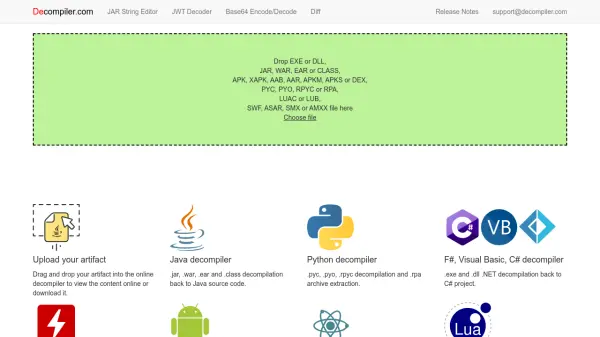
Decompiler.com is a free online service that allows users to reverse-engineer compiled applications and bytecode into readable source code or project files. It supports a wide range of formats including Java (JAR, WAR, EAR, CLASS), .NET (EXE, DLL), Python (PYC, PYO, RPYC), Android (APK, XAPK, AAB, AAR, APKM, APKS, DEX), Flash (SWF), Electron (ASAR), Lua (LUAC, LUB), and SourceMod (SMX, AMXX). The tool automatically detects the file type and decompiles it, enabling developers and researchers to inspect the original code structure.
The platform also includes auxiliary tools such as a JAR string editor, JWT decoder, Base64 encoder/decoder, and a diff tool for comparing decompiled files. With a simple drag-and-drop interface, Decompiler.com provides a quick and accessible way to analyze software components without installing any software locally.
Features
- Multi-format support: Decompiles Java, .NET, Python, Android, Flash, Electron, Lua, and SourceMod files.
- Automatic detection: Automatically identifies the file type and applies the appropriate decompiler.
- Online and free: No installation required; all processing happens in the browser.
- Additional tools: Includes JAR string editor, JWT decoder, Base64 encode/decode, and diff tool.
- Drag-and-drop upload: Simple file upload via drag-and-drop or file chooser.
Use Cases
- Reverse-engineering software to understand its internal logic.
- Recovering lost source code from compiled files.
- Analyzing malware or suspicious executables.
- Inspecting Android APK files for security vulnerabilities.
- Comparing different versions of decompiled code using the diff tool.
- Educational purposes for learning how compiled code translates to source.
FAQs
-
Is Decompiler.com free to use?
Yes, Decompiler.com is completely free to use. There are no charges for uploading and decompiling files. -
What file formats does Decompiler.com support?
It supports EXE, DLL, JAR, WAR, EAR, CLASS, APK, XAPK, AAB, AAR, APKM, APKS, DEX, PYC, PYO, RPYC, RPA, LUAC, LUB, SWF, ASAR, SMX, and AMXX files. -
Do I need to install any software to use the decompiler?
No, Decompiler.com works entirely in your web browser. No installation is required. -
Can I compare two decompiled files?
Yes, the platform includes a diff tool that allows you to compare JAR, APK, WAR, EXE, DLL, and DEX files.