What is Compass Online?
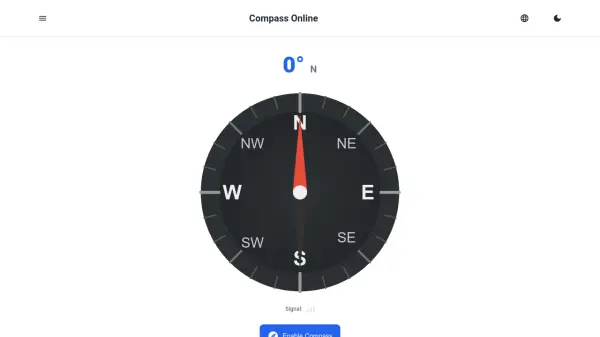
Compass Online is a digital compass tool that works directly in your web browser. It uses your smartphone or tablet's built-in magnetometer sensor to detect the Earth's magnetic field and accurately point to magnetic North. The interface displays a classic compass needle with a rotating dial, showing the exact direction in degrees and cardinal points (N, S, E, W, NE, etc.).
When you enable location access, Compass Online also provides your precise GPS coordinates, elevation above sea level, and local sunrise/sunset times. The tool includes a calibration feature to improve accuracy and offers support for multiple languages. It is designed for outdoor enthusiasts, travelers, educators, and anyone needing quick directional guidance without installing an app.
Features
- Real-time Compass Needle: Displays a dynamic needle that always points to magnetic North.
- Digital Readout: Shows exact direction in degrees and cardinal/ordinal letters (N, NE, E, etc.).
- Location Information: With permission, displays GPS coordinates, elevation, and local sunrise/sunset times.
- Calibration Tool: Guides users to move their device in a figure-8 pattern to improve accuracy.
- Multilingual Support: Available in 20 languages including English, Hindi, Spanish, French, German, and more.
- Share My Location: Allows sharing current coordinates via Google Maps, Apple Maps, Waze, and other apps.
Use Cases
- Finding cardinal directions while hiking or camping.
- Determining your current GPS coordinates for navigation or geocaching.
- Checking elevation and sunrise/sunset times for outdoor planning.
- Teaching geography or orienteering in educational settings.
- Quickly orienting yourself in an unfamiliar city or wilderness.
- Calibrating other navigation tools or apps.
FAQs
-
Does Compass Online work on desktop computers?
Most desktop computers and laptops lack a magnetometer sensor, so the compass will likely not work on them. It is designed for smartphones and tablets. -
Why is my compass not working?
The most common causes are missing sensor permissions or calibration issues. Ensure your browser has permission to access motion sensors, and try moving your device in a figure-8 pattern to calibrate. -
How accurate is the online compass?
Accuracy depends on your device's magnetometer and calibration. Proper calibration and keeping away from magnetic interference (metal objects, electronics) improves accuracy. -
How do I enable location access for Compass Online?
When prompted by the website, click 'Allow' or 'Enable Location'. You can also manage permissions in your browser settings under site permissions.