What is Chive?
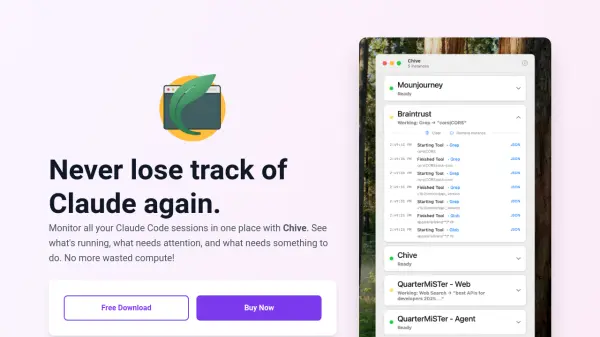
Chive is a macOS application designed to optimize Claude Code workflows by monitoring all active sessions in a single window. It allows users to name instances by project and instantly identify which sessions require attention, eliminating the need to switch between multiple terminals. The tool integrates seamlessly with various development environments and workflows, including VS Code, Cursor, Windsurf, Zed, and Terminal, as well as tools like BMad, SuperClaude, claude-swarm, and configurations such as --dangerously-skip-permissions.
Setup involves copying settings into the Claude config without CLI modifications or complex integrations, ensuring zero friction. Chive operates fully locally and sandboxed, with no GitHub access required, maintaining privacy by never accessing or transmitting user code. Built with Swift for native Mac performance, it is small, fast, and memory-efficient, avoiding Electron or web wrappers. Pricing is based on a one-time purchase for a lifetime license, including free updates for a year, with no subscriptions or upsells.
Features
- Session Monitoring: Monitor all Claude Code sessions in one window with project-based naming
- Tool Compatibility: Works with VS Code, Cursor, Windsurf, Zed, Terminal, and tools like BMad or SuperClaude
- Local Privacy: Fully local and sandboxed operation without code access or transmission
- Native Performance: Built with Swift for efficient macOS performance without Electron wrappers
- One-Time Pricing: Lifetime license with free updates for a year and no subscriptions
Use Cases
- Monitoring multiple Claude Code sessions for project management
- Optimizing compute usage by tracking active sessions
- Enhancing developer workflow with unified session oversight
- Ensuring privacy in Claude Code development environments
- Streamlining setup for Claude Code integration on macOS
FAQs
-
How does Chive work?
Chive uses hooks to automatically detect when Claude Code events occur and provides a unified dashboard to monitor all active sessions. -
Is my code safe?
Absolutely. Chive runs 100% locally on your machine and never sends your code anywhere, with no servers involved. -
What's included in the free download?
The free trial is fully functional for 75 minutes of running time and displays the first instance indefinitely, with a license required for unlimited use. -
What versions of Claude Code does it work with?
Chive works with Claude Code version 1.0.38 and newer, and is automatically compatible with future updates. -
Can I use my license on multiple machines?
Yes, the license is per-user, allowing use on multiple machines like laptops or desktops where Claude Code is installed.