
What is CamFind?
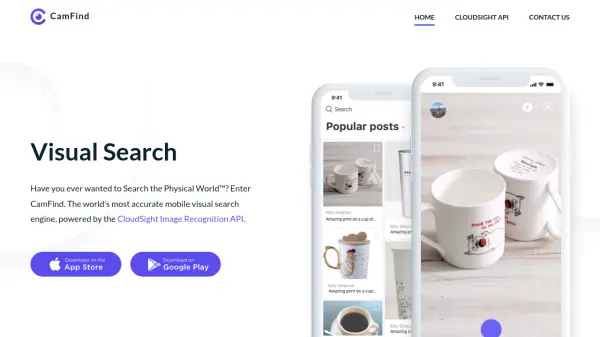
CamFind is a powerful mobile application designed to transform the way users interact with the physical world by providing instant visual search capabilities. Powered by the CloudSight Image Recognition API, CamFind enables users to simply take a picture of any object to receive immediate, accurate identification and detailed information without the need for typing. This AI-driven technology offers a seamless experience, making it easy to understand and explore the objects and environments around you.
Upon capturing an image, CamFind generates a range of relevant results in seconds, including related photos, videos, local shopping options, and web-based resources. Users can save searches, follow others for discovery, create private collections, set visual reminders, and store images offline. The app also allows sharing of findings with friends and provides AI-driven query responses, facilitating an enriched search and discovery experience for real-world objects.
Features
- Visual Search: Identify objects instantly by taking a picture with your mobile device.
- AI-Powered Image Recognition: Uses CloudSight technology for fast and accurate identification.
- Comprehensive Results: Retrieves relevant images, videos, shopping results, and web content.
- Offline Storage: Safely store and search images offline within the app.
- Visual Reminders: Set alarms linked to images and personal descriptions as reminders.
- Private Collections: Organize favorite searches and images into personal collections.
- Social Features: Follow friends, share findings, and discover content on your feed.
- Ask AI: Query the AI for additional information directly from search results.
Use Cases
- Identifying unknown objects or products instantly using smartphone camera.
- Searching for similar products and shopping options based on a photograph.
- Translating and identifying items while traveling abroad.
- Creating visual reminders and alarms for important tasks using photographed objects.
- Organizing and saving personal collections of identified objects
- Sharing findings and discoveries with friends and online followers.
FAQs
-
What platforms is CamFind available on?
CamFind is a mobile application, available for major smartphone platforms. -
How does CamFind identify objects?
CamFind uses advanced AI-powered image recognition technology to analyze photos and return accurate identification results. -
Can I use CamFind without an internet connection?
CamFind allows users to store images offline, which can be searched or used to create visual reminders when connectivity is restored. -
Does CamFind support sharing and social features?
Yes, users can save, share findings, follow others, and discover additional content through their social feed.