Blue favicon

Blue
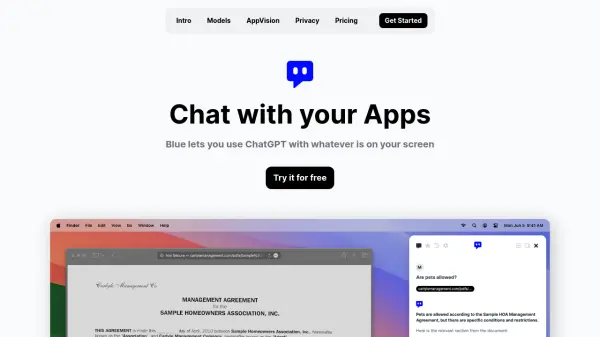
ChatGPT with Whatever is on Your Screen

What is Blue?

Blue is a sophisticated MacOS native AI assistant that seamlessly integrates with your workflow through a simple keyboard shortcut (option + space). It utilizes AppVision technology to understand and analyze whatever is on your screen, enabling contextual AI assistance across all your Mac applications.

The application prioritizes user privacy with GDPR compliance, on-device data storage, and AES-256 encryption using your Apple ID. Powered by Microsoft's AI models, including GPT-4 and GPT-3.5 Turbo, Blue offers professional-grade assistance while ensuring your sensitive data remains secure and is never used for model training.

Features

  • AppVision Technology: Analyzes and understands screen content for contextual assistance
  • Native MacOS Integration: Access via option + space keyboard shortcut
  • Enhanced Privacy: On-device data storage with AES-256 encryption
  • Multiple AI Models: Automatic switching between GPT-4 and GPT-3.5 Turbo
  • Professional Security: GDPR-compliant with EU-based data processing

Use Cases

  • Code assistance and development
  • Report writing and editing
  • Content brainstorming
  • Screen content analysis
  • Document translation
  • Task automation
  • Professional workflow optimization

FAQs

  • How secure is my data with Blue?
    All data is stored locally on your Mac, encrypted with AES-256 using your Apple ID, and is never used for model training. Data processing for EU users never leaves the EU.
  • How many GPT-4 tokens do I get with the Starter plan?
    The Starter plan includes 250,000 tokens for GPT-4, which is sufficient for 10-15 daily messages over a month. After exhausting the quota, it continues with GPT-3.5.
  • What happens if I exceed my token limit?
    If you exhaust your monthly GPT-4 quota, Blue will continue working with GPT-3.5 only.

Related Queries

Helpful for people in the following professions

Related Tools:

Blogs:

  • AI thumbnail maker tools

    AI thumbnail maker tools

    Automatically generate visually appealing and optimized thumbnails for various digital content, streamlining the design process and enhancing visual engagement

  • Top 6 AI note-taking tools for 2026: in-person, online, and hybrid use cases

    Top 6 AI note-taking tools for 2026: in-person, online, and hybrid use cases

    Most AI note-taking lists are really lists of meeting bots, which join your video call and transcribe it. That's useful, but it's half the picture. Decisions happen in hallway conversations, client dinners, on-site visits, and hybrid rooms where nobody is on a video link. This guide covers different parts of the note-taking workflow: hardware capture for in-person settings, platform-native tools for online calls, and AI layers for organizing and synthesizing what you've captured. It compares six tools by capture context, workflow fit, pricing, and limitations.

  • Best AI tools for recruiters

    Best AI tools for recruiters

    These tools use advanced algorithms and machine learning to automate tasks such as resume screening, candidate matching, and predictive analytics. By analyzing vast amounts of data quickly and efficiently, AI tools help recruiters make data-driven decisions, save time, and identify the best candidates for open positions.

  • AI tools for video voice overs

    AI tools for video voice overs

    Discover the next level of video production with AI-powered voiceover tools. Enhance your content effortlessly, ensuring professional-quality narration for your videos.

Didn't find tool you were looking for?

Be as detailed as possible for better results