What is Autopilot?
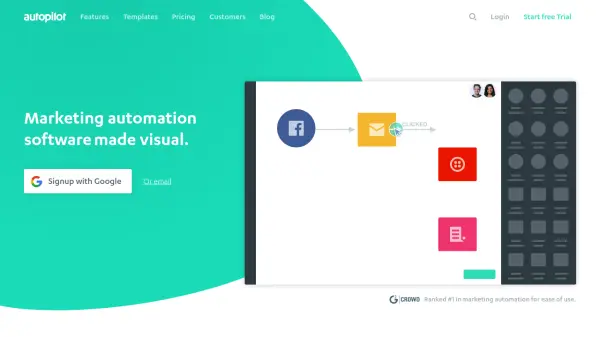
Autopilot offers an intuitive, visual platform for automating marketing tasks and managing customer journeys from lead capture to retention. Businesses can create tailored workflows that engage customers at optimal moments using personalized messaging through channels such as email, SMS, in-app messaging, and retargeting ads.
With its robust feature set, Autopilot helps automate repetitive tasks, nurture leads, onboard new users, and improve customer loyalty, all while providing in-depth analytics and insights. Seamless integration with popular apps and collaborative tools enhances efficiency, enabling teams to build memorable customer experiences that drive conversions and repeat business.
Features
- Visual Journey Builder: Drag-and-drop interface to design marketing workflows
- Multi-Channel Messaging: Engage customers via email, SMS, in-app, and retargeting
- Personalized Communication: Send tailored messages based on customer behavior
- Lead Management: Capture, nurture, and score leads automatically
- Customer Segmentation: Target specific audiences for improved engagement
- Marketing Analytics Dashboards: Track performance and gain actionable insights
- CRM Integrations: Connect with Salesforce, HubSpot, Pipedrive, and more
- A/B Testing: Optimize email marketing with split tests
- Automated Customer Onboarding: Educate and engage new users seamlessly
- Data-Driven Marketing: Inform strategies with real-time analytics and reporting
Use Cases
- Automating lead capture and nurturing for SaaS businesses
- Onboarding new customers with personalized email sequences
- Retargeting website visitors through Facebook and Google Ads
- Running A/B tests on email campaigns to improve open rates
- Segmenting customers for targeted messaging and promotions
- Reducing cart abandonment with automated follow-up
- Coordinating multi-channel campaigns with teams
- Automating post-purchase engagement and review requests
FAQs
-
What communication channels does Autopilot support?
Autopilot supports email, SMS, in-app messaging, Facebook retargeting, Google Ads retargeting, and postcard marketing to help you reach customers across multiple platforms. -
Can I integrate Autopilot with my existing CRM?
Yes, Autopilot integrates with popular CRM platforms like Salesforce, HubSpot, and Pipedrive to synchronize customer data and streamline marketing workflows. -
Does Autopilot offer analytics and reporting features?
Autopilot provides comprehensive marketing analytics dashboards, enabling users to track campaign performance, customer engagement, and journey effectiveness.