
What is Astiga?
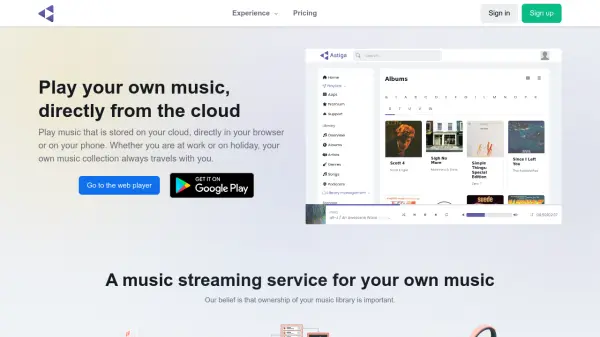
Astiga enables you to play music stored on your cloud storage services directly in your browser or on your phone. It supports a wide range of cloud providers including Google Drive, Dropbox, OneDrive, Amazon S3, and many others via WebDAV, FTP, or SFTP. The platform also functions as a Subsonic server, allowing compatibility with various Subsonic apps across devices. With features like library generation, playlist mixing from multiple sources, and support for various audio formats, Astiga offers the convenience of a streaming service while keeping you in control of your music collection.
Features
- Cloud Storage Integration: Supports Google Drive, Dropbox, OneDrive, Amazon S3, and many more via WebDAV, FTP, SFTP.
- Subsonic Server: Acts as a Subsonic server, compatible with Subsonic apps for Android, iOS, Windows, macOS, Linux.
- Library Management: Generates music library with albums, artists, genres, and search support.
- Multi-Source Playlists: Mix audio from multiple cloud providers into single playlists.
- Broad Device Support: Works in browsers, on phones, Android Auto, Chromecast, Google Home, Sonos.
- Audio Format Support: WAV, MP3, AAC, OGG, Opus, WebM, ALAC, FLAC, and more.
- Privacy Focused: Does not share information with third parties.
- Green Hosting: Hosted in Germany using renewable energy.
Use Cases
- Stream personal music collection while traveling
- Access music library from work or on holiday
- Replace music streaming services with own library
- Listen to music in car via Android Auto
- Cast music to TV or speakers via Chromecast
- Voice-controlled music playback with Google Home
- Integrate music with Sonos system
FAQs
-
What cloud services are supported?
Dropbox, Google Drive, OneDrive, Amazon S3, 4Shared, CloudMe, Icedrive, Koofr, MagentaCLOUD, MyDrive, OpenDrive, ownCloud, pCloud, Pydio, Storage Made Easy, Strato HiDrive, Synology NASes, Yandex, and many more via WebDAV, FTP(S), or SFTP. -
Can I use Astiga on my phone or tablet?
Yes, there is an Astiga Android app, the website works on Android and iOS, and you can use Subsonic-compatible apps like Subsonic, DSub, iSub, and SuperSonic. -
How does Astiga differ from Spotify, Deezer, and Pandora?
Astiga focuses on making your own music library available everywhere. It does not host music but uses your cloud storage, offering convenience of streaming while you control your music.