
What is APLMate?
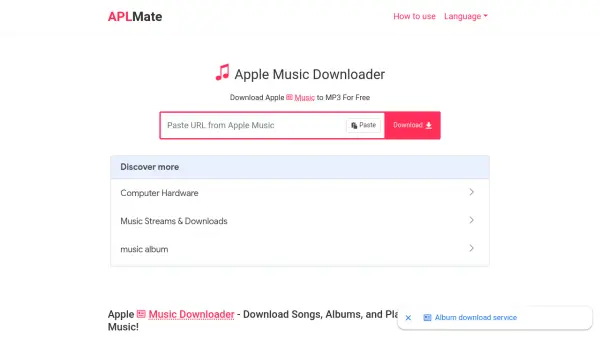
APLMate is a free online tool that allows you to download songs, albums, and playlists from Apple Music as MP3 files. Simply copy the URL of the desired content from Apple Music, paste it into the APLMate website, and click download. The service processes the link and provides a high-quality MP3 file (up to 320kbps) that can be saved directly to your computer or mobile device.
APLMate is designed to be user-friendly and requires no installation, subscription, or login. It works across all browsers and devices, including phones, computers, and tablets. The tool is ad-free and unlimited, allowing you to download multiple tracks without restrictions. Downloaded files retain metadata such as artist and album information for organized music libraries.
Features
- Downloads Apple Music songs: Convert individual tracks to MP3 format.
- Downloads Apple Music albums: Save entire albums with a single click.
- Downloads Apple Music playlists: Download full playlists effortlessly.
- High-quality MP3 output: Get audio at 320kbps bitrate for clear sound.
- Free and unlimited: No payment or download limits; no hidden fees.
- No account required: Use without an Apple Music subscription or login.
- Works on all devices: Compatible with phones, tablets, and computers.
- Ad-free experience: Enjoy clean interface without annoying advertisements.
Use Cases
- Downloading Apple Music songs for offline listening without internet.
- Saving Apple Music albums to MP3 for use on non-Apple devices.
- Backing up Apple Music playlists in a universal audio format.
- Creating MP3 archives of favorite tunes for personal media collections.
- Transferring Apple Music tracks to old music players that lack streaming.
FAQs
-
Do I have to pay to download Apple Music songs?
No, the Apple Music to MP3 downloader service is always free. -
Do I need an Apple Music account to use this?
No. APLMate lets you download songs without needing an Apple Music subscription or login. -
Do I need to install extensions to use Apple Music Downloader?
No. Just paste an Apple Music album or track link into the input field and click Download. -
Is it possible to download multiple songs at once at APLMate?
Yes, it's completely unlimited. You can download any number of Apple Music tracks as MP3. -
Does APLMate keep a copy of the downloaded song?
No, we do not back up any user information or personal tracks, so it is completely secure.