AceIT AI favicon

AceIT AI
Your Ultimate Study Companion for the South African CAPS Curriculum

What is AceIT AI?

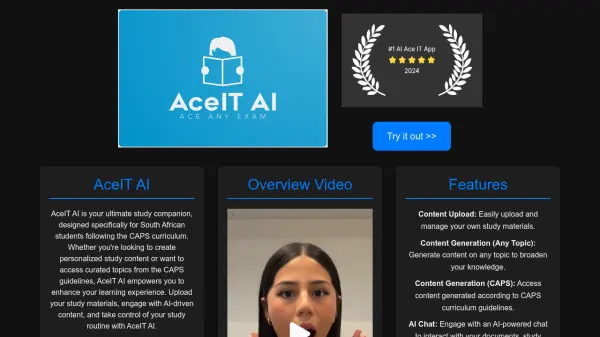
AceIT AI is a specialized study tool created to support South African students following the CAPS curriculum. It allows students to take control of their study routines and enhance their learning experience.

The platform empowers users to upload their own study materials and engage with AI-generated content. AceIT AI facilitates access to curated topics that are derived directly from the CAPS guidelines, ensuring relevant and focused studying.

Features

  • Content Upload: Easily upload and manage your own study materials.
  • Content Generation (Any Topic): Generate content on any topic to broaden your knowledge.
  • Content Generation (CAPS): Access content generated according to CAPS curriculum guidelines.
  • AI Chat: Engage with an AI-powered chat to interact with your documents, study materials, and generated content.
  • Workspaces: Organize your study sessions with workspaces that store previously generated content, chats, and practice exams.

Use Cases

  • Creating personalized study notes
  • Generating practice questions based on uploaded materials
  • Understanding complex topics through AI-powered explanations
  • Organizing study materials by subject or exam
  • Accessing CAPS curriculum-specific content

Helpful for people in the following professions

Related Tools:

Blogs:

  • Best AI tools for Room Design

    Best AI tools for Room Design

    Discover cutting-edge AI tools that redefine the art of room design. From layout optimization to aesthetic finesse, these top-tier tools enhance your space to new heights.

  • Ghibli Art Generator AI tools

    Ghibli Art Generator AI tools

    List of the best AI tools to turn your photos into images that look like Studio Ghibli movies. Easy to use and fun for everyone.

  • Top 6 AI note-taking tools for 2026: in-person, online, and hybrid use cases

    Top 6 AI note-taking tools for 2026: in-person, online, and hybrid use cases

    Most AI note-taking lists are really lists of meeting bots, which join your video call and transcribe it. That's useful, but it's half the picture. Decisions happen in hallway conversations, client dinners, on-site visits, and hybrid rooms where nobody is on a video link. This guide covers different parts of the note-taking workflow: hardware capture for in-person settings, platform-native tools for online calls, and AI layers for organizing and synthesizing what you've captured. It compares six tools by capture context, workflow fit, pricing, and limitations.

Didn't find tool you were looking for?

Be as detailed as possible for better results