What is 3DOptix?
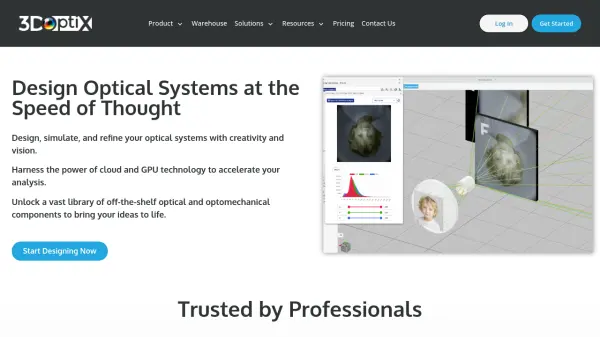
3DOptix provides a comprehensive platform for designing, simulating, and assembling optical systems through an intuitive web-based interface. The software leverages cloud and GPU technology to accelerate optical analysis, allowing users to create digital twins of their optical setups with precision and efficiency.
Users can access a vast cross-vendor catalog of off-the-shelf optical and optomechanical components to build systems quickly. The platform includes powerful simulation tools for visualizing performance and analyzing optical behavior. Once designs are validated, users can transition from virtual models to physical assembly with confidence. The 3DOptix Warehouse serves as a social platform where optical professionals can share designs, collaborate, and access thousands of pre-built optical models.
Features
- Cloud-Based Simulation: GPU-accelerated optical analysis for rapid performance visualization
- Extensive Component Library: Access to cross-vendor catalog of optical and optomechanical components
- Digital Twin Creation: Build virtual replicas of optical systems for design validation
- Collaborative Warehouse: Social platform for sharing and accessing thousands of optical design models
- Intuitive Interface: Drag-and-drop functionality with visual design tools for ease of use
Use Cases
- Designing laser beam machining systems
- Academic research in optical physics and quantum optics
- Educational demonstrations in optical engineering courses
- Imaging system development and optimization
- Prototyping optical setups for experimental validation
FAQs
-
What is a GPU hour in 3DOptix?
A GPU hour measures computational time by a GPU core. Running a simulation on one GPU for one hour consumes one GPU hour. Preprocessing and postprocessing activities do not use GPU hours. -
Do GPU hours carry over between subscription periods?
GPU hours do not accumulate year-to-year. They reset to the plan's allocation at the start of each annual subscription period. -
Are designs private on 3DOptix?
Student plan designs are public and appear in the Warehouse. Professional, Academic, and Enterprise plans have private designs by default, with secure storage and optional publishing to the Warehouse. -
Can 3DOptix be used in academic publications?
Yes, users can reference 3DOptix appropriately in publications when using the software for their work. -
What are the differences between monthly and yearly plans?
Yearly plans offer 10% savings and provide 500 GPU hours per year. Monthly plans provide 40 GPU hours per month with more flexibility but at a higher annual cost.