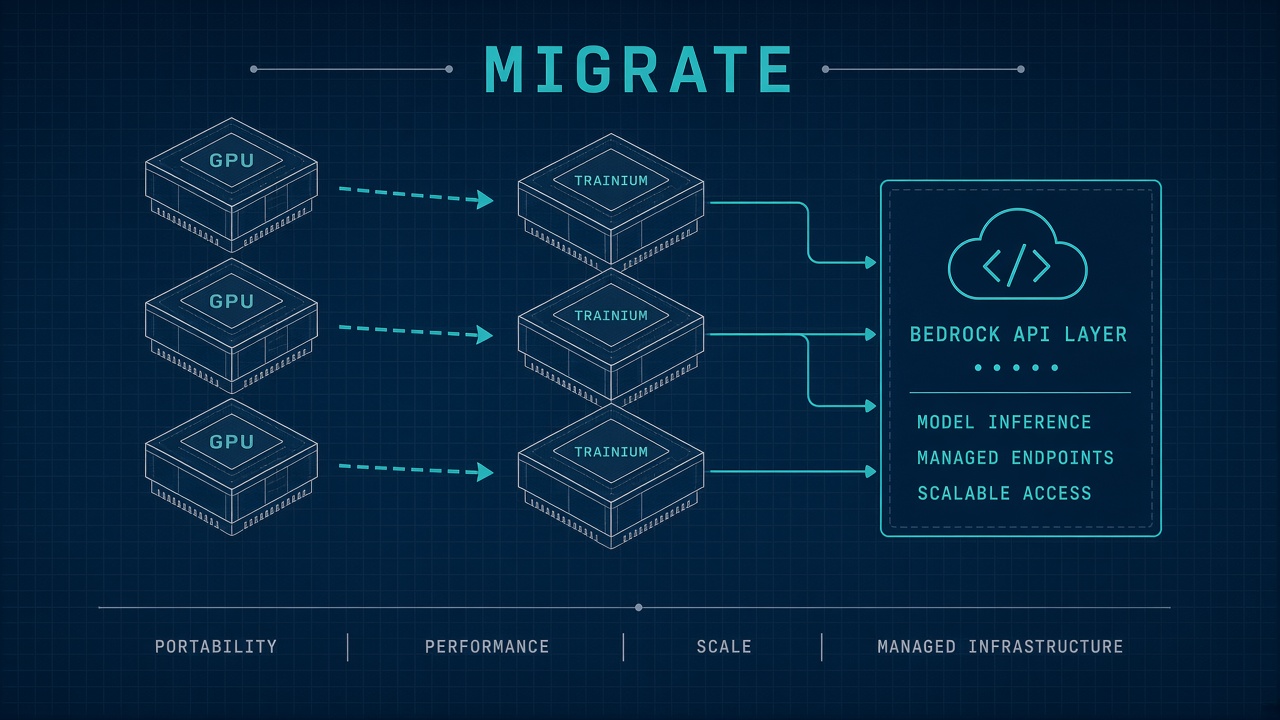
AWS linked Bedrock foundation model serving to Trainium3 accelerators in 2026, giving teams a serverless path to Trainium price-performance without managing EC2 instances. The aws bedrock trainium migration decision is not a single switch: some workloads should move from GPU endpoints to Bedrock APIs, others should migrate self-hosted inference to SageMaker on Trn2 or Trn3 UltraServers, and hybrid architectures remain common for latency-sensitive or custom-model requirements.
This guide covers eligible models and regions, migration prerequisites, benchmarking methodology, cost monitoring setup, and a compatibility matrix for ML teams running AI code and inference pipelines on AWS AI infrastructure.
Eligible Models and Supported Regions
Amazon Bedrock abstracts hardware selection for foundation models, while direct Trainium access requires EC2 Trn2 or Trn3 UltraServers or SageMaker endpoints in supported regions. Bedrock production workloads on Trainium3 cover select high-volume models AWS operates internally. Custom Model Import supports on-demand inference in US East (N. Virginia) and US West (Oregon) with CMU-based billing rather than instance-hour pricing.
| Deployment path | Hardware exposure | Primary regions (2026) | Best for |
|---|---|---|---|
| Bedrock foundation models | Fully managed (Trainium3 backend for select models) | us-east-1, us-west-2, eu-central-1, and others per model card | Serverless API access, no ops overhead |
| Bedrock Custom Model Import | CMU abstraction, no instance pick | us-east-1, us-west-2 | Imported open-weight models (Llama, Mistral architectures) |
| SageMaker on Trainium | Trn2.48xlarge, Trn3 UltraServers | Varies by instance; check EC2 Trainium pages | Custom kernels, quantization, multi-model serving |
| EC2 + vLLM Neuron | Direct NeuronCore control | Trn2 regions with Neuron DLAMI | Llama, Mistral via NxD Inference and vLLM |
AWS Transform model-to-model migration assessment (available in us-east-1, eu-central-1, ap-northeast-1, and other listed regions) helps teams map OpenAI, Gemini, or Anthropic SDK calls to Bedrock Converse API patterns. That tool addresses application code migration, not Trainium instance provisioning.
Migration Prerequisites Before Leaving GPU Instances
Successful bedrock trainium instances migration starts with workload classification: API-bound applications suit Bedrock, while teams needing tensor parallelism control or custom quantization stay on SageMaker Trainium endpoints. Document current token throughput, p99 latency, context length distribution, and whether workloads require bidirectional streaming before choosing a target.
- Inventory SDK dependencies: LangChain, LiteLLM, or direct OpenAI clients need Converse API mapping
- Verify model support: Custom weights must match Bedrock Custom Model Import architectures or Neuron-supported families
- Install Neuron SDK: Trn2 migrations require Neuron DLAMI or Docker with neuronx-distributed-inference
- Precompile artifacts: Set NEURON_COMPILED_ARTIFACTS to avoid startup compilation delays on Trainium
- Update vLLM flags: Set VLLM_NEURON_FRAMEWORK=neuronx-distributed-inference when migrating from Transformers NeuronX
- Configure IAM and KMS: Bedrock and SageMaker endpoints need model access policies and encryption keys
Teams migrating from Transformers NeuronX to NxD Inference must remap override_neuron_config parameters. Batch size, sequence length, and bucketing settings differ between libraries. AWS documentation provides a parameter migration table for Llama and Mistral model families commonly deployed on Trn2.48xlarge.
Performance Benchmarking on Trainium
Benchmark Bedrock and Trainium paths with identical prompt mixes, measuring tokens per second, time-to-first-token, and cost per million tokens rather than raw FLOPS claims. AWS reports Trainium3 delivers up to 3x faster Bedrock serving versus Trainium2, but your workload may differ based on input-output token ratio and concurrent request patterns.
For self-managed Trn2 deployments, run vLLM serve with --device neuron and tensor-parallel-size matching your instance NeuronCore count. Warm up with representative traffic before measuring. Compare against GPU baselines on the same model weights and quantization level. SageMaker inference components allow scale-to-zero for bursty workloads where always-on GPU instances waste budget.
- Measure p50 and p99 latency at expected concurrency, not single-request best case
- Include compilation and cold-start time for Neuron JIT builds in migration timelines
- Test long-context prompts separately; bucketing configs affect both latency and throughput
- Validate function-calling and tool-use paths if migrating agent workloads to Bedrock Converse
Cost Monitoring Setup for Bedrock and Trainium
Bedrock bills per input and output token for foundation models, or per CMU-minute for Custom Model Import with five-minute billing windows after the first successful invocation. Trainium EC2 and SageMaker endpoints bill per instance-hour or inference component active time. Unified cost visibility requires tagging and CloudWatch metrics aligned to each path.
| Metric source | What to track | Cost formula hint |
|---|---|---|
| Bedrock model invocation logs | InputTokens, OutputTokens per modelId | Token price x volume from pricing page |
| Custom Model Import CloudWatch | ModelCopy count, CMUs per copy | Copies x CMUs x $/CMU-min x active minutes |
| EC2 Trn2/Trn3 billing | Instance hours, UltraServer allocation | On-demand or Savings Plan hourly rate |
| Cost allocation tags | Team, environment, workload labels | AWS Cost Explorer group-by tag |
Set CloudWatch alarms on ModelCopy scaling for Custom Model Import to catch runaway autoscaling during traffic spikes. For SageMaker, use inference component auto-scaling policies with minimum instance counts that match your latency SLA rather than over-provisioning for peak theoretical load.
Frequently Asked Questions
Can I choose Trainium instances directly in Bedrock?
No. Bedrock fully abstracts hardware. AWS routes eligible production models to Trainium3 internally. Teams needing instance-level control deploy on SageMaker or EC2 Trn instances with the Neuron SDK.
When should I migrate to Bedrock instead of self-hosted Trainium?
Choose Bedrock when you want serverless scaling, managed model updates, and minimal ops overhead. Choose SageMaker Trainium when you need custom quantization, proprietary weights, kernel tuning, or bidirectional streaming not available through Bedrock APIs.
What models work with vLLM on Trainium?
As of 2026, Llama and Mistral architectures are the primary vLLM Neuron integrations via NxD Inference. Verify model card compatibility in AWS Neuron documentation before planning migration off GPU vLLM.
How does Custom Model Import pricing compare to EC2 Trainium?
Custom Model Import uses CMU-minute billing with five-minute windows plus monthly CMU storage. EC2 Trainium bills instance hours regardless of inference volume. High-utilization steady workloads may favor reserved Trainium capacity; bursty or experimental workloads may favor Bedrock import on-demand.
Does AWS Transform help with Trainium migration?
AWS Transform model-to-model assessment helps migrate application code from other GenAI providers to Bedrock APIs. Trainium instance migration is a separate infrastructure decision handled through SageMaker, EC2, or Bedrock Custom Model Import paths.