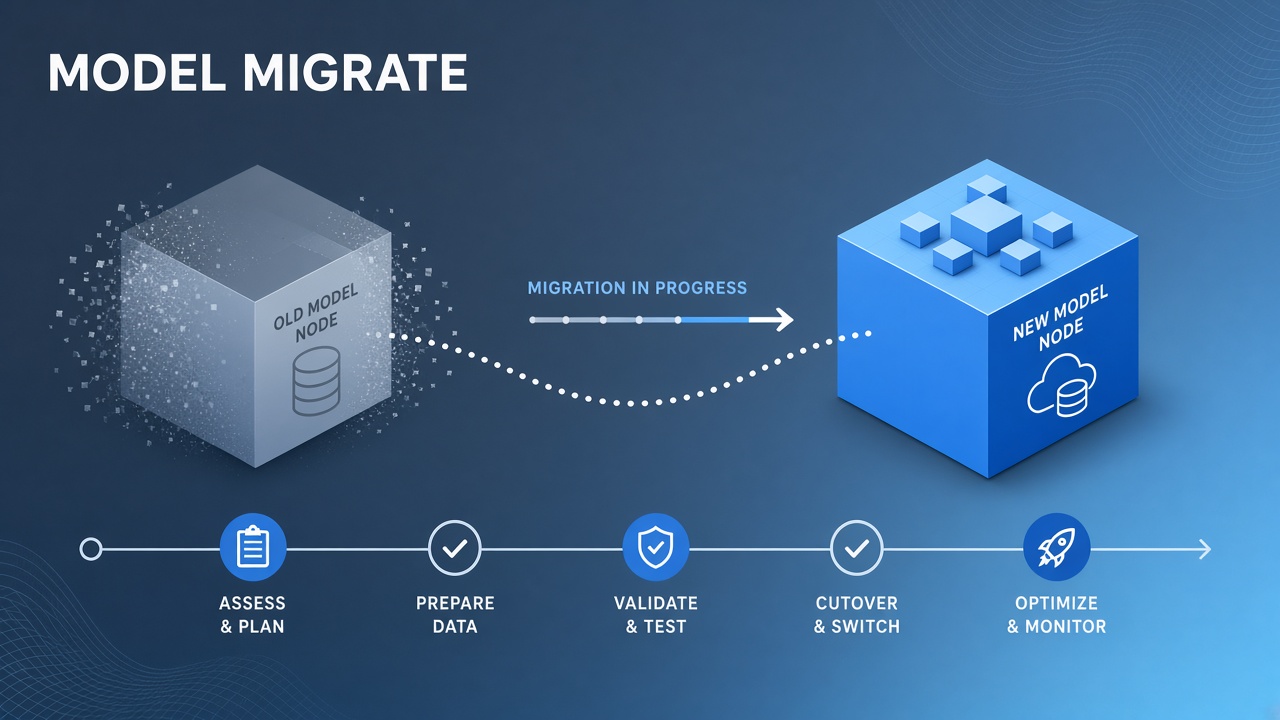
The email arrives: your production model retires in ninety days. Chatbots drift. Eval scores change overnight when someone bumps a default in staging. Customer-facing copy still names the old model. A disciplined AI model deprecation migration plan turns panic into a checklist tied to vendor cutoff dates, not calendar guesswork.
This guide covers inventory, eval harnesses, SDK and environment updates, and user communication. Marketing teams using AI marketing tools and engineering teams on AI code assistant integrations share the same migration mechanics when providers sunset model IDs.
Inventory Workflows Using Deprecated Model
You cannot migrate what you have not mapped. Build a complete inventory of every reference to the retiring model ID before changing defaults. Search is not only Git: check environment variables in deployment platforms, no-code Zapier steps, feature flags, prompt templates in CMS, mobile app bundles, and cron jobs on forgotten servers.
| Location | What to search | Owner |
|---|---|---|
| Application code | Hardcoded model strings, config files | Engineering |
| Infrastructure | MODEL, OPENAI_MODEL env vars |
Platform / DevOps |
| No-code automation | Zapier, Make, Retool AI steps | Ops / citizen developers |
| Prompt libraries | LangSmith, internal wiki, Notion | Product / ML |
| Vendor usage logs | API dashboard filter by model name | FinOps |
For migrate deprecated ai model programs, export thirty days of API usage grouped by model ID and API key. Keys map to services; services map to teams. Orphan traffic on deprecated ID after you thought migration finished reveals shadow integrations. Tag each workflow with criticality: customer-facing, internal-only, batch offline, experimental.
Record vendor recommended replacement model and any behavior notes (context window change, tool calling differences, JSON mode quirks). Not all "successor" models are drop-in replacements. Document temperature, max tokens, and system prompt length limits that differ between old and new IDs.
- Export usage report filtered by deprecated model ID.
- Grep repos and scan env vars for model string literals.
- Survey teams for no-code and spreadsheet API calls.
- Build spreadsheet: workflow name, owner, env, traffic volume, criticality, target replacement.
- Assign migration deadline per row at least two weeks before vendor cutoff.
Run Eval Harness on Replacement Model
Replace model ID only after eval harness passes on representative prompts from production logs. Subjective "looks fine" testing misses regression on edge cases: JSON schema compliance, refusal behavior, multilingual inputs, long context retrieval, and tool call argument shapes.
Build eval set from anonymized production prompts stratified by category (support, codegen, summarization, classification). Include known failure cases from past incidents. Run old and new model side by side; score with automated checks (JSON parse success, regex on required fields, embedding similarity to golden answers) plus human review sample for high-risk categories.
| Metric | Why it matters | Pass threshold |
|---|---|---|
| Structured output validity | Downstream parsers break on invalid JSON | Equal or better than old model |
| Latency p95 | UX and timeout configs depend on speed | Within agreed SLO band |
| Cost per task | New model may change token pricing | Finance sign-off if over budget |
| Safety refusal rate | Stricter model blocks legit business prompts | Review flagged deltas manually |
For ai model sunset plan execution, gate production cutover on eval report signed by product and engineering. Store eval artifacts with git SHA and model version for audit. Re-run eval when vendor ships minor updates to replacement model name suffix.
Teams using code assistants should include compile-and-test tasks in eval, not only string match on generated code. Marketing copy evals should check brand voice rubric and factual claims against source documents, especially when marketing workflows generate customer-facing email.
Update SDK Defaults and Env Vars
Centralize model ID in configuration; deploy config change before vendor cutoff with canary traffic.
Hardcoded model strings in application code cause drift. Preferred pattern: single env var or config service key per environment
(LLM_MODEL_PRIMARY), default in code pointing to approved replacement, override in staging first.
SDK defaults change between library versions. Upgrading OpenAI, Anthropic, or Google SDK without reading changelog may silently switch default model on next deploy. Pin SDK version during migration window; upgrade SDK and model ID in separate releases with eval between them.
- Add replacement model to staging env var.
- Route 5% canary traffic or internal users only.
- Monitor error rate, latency, token usage, user feedback.
- Roll forward to 100% staging, then production canary, then full production.
- Remove deprecated model string from codebase after zero API traffic for seven days.
For
replace retired llm
in multi-tenant SaaS, support per-tenant override during grace period so enterprise customers finish internal validation. Feature flag
use_legacy_model with automatic expiry on vendor cutoff date prevents indefinite dependency on retired ID.
Infrastructure-as-code repos need same update as application repos. Terraform env for Lambda, Kubernetes ConfigMaps, and CI pipeline secrets often hold model names engineers forget during code search. Include IaC in inventory sweep.
Communicate Cutoff to Users
Internal teams and external customers need clear cutoff dates, expected behavior changes, and support channel before migration. External comms: in-app banner, status page note, email to admins for B2B products. Document if output style may change slightly even when functionality is preserved. Under-promise on identical behavior unless eval proves parity.
Internal comms: Slack announcement with link to inventory spreadsheet, migration runbook, and named DRI per squad. Office hours during final two weeks before vendor shutdown. Freeze unrelated prompt changes during cutover week to isolate regressions.
Support macro for tickets: "We upgraded to [model name] on [date] because [vendor] retired [old model]. If you see [specific symptom], try [action]. Escalate with request ID if issue persists." Train support before customer-visible switch, not after ticket spike.
Post-migration: monitor CSAT, error logs, and re-opened tickets tagged with model migration for thirty days. Rollback plan remains viable only before vendor hard cutoff; after sunset, rollback means emergency rewrite to still-supported model, not re-enabling old ID.
Migration Timeline Template
Adapt dates to vendor notice period. Example for ninety-day notice:
| Week | Milestone |
|---|---|
| 1 to 2 | Inventory complete; owners assigned |
| 3 to 4 | Eval harness built; baseline on old model |
| 5 to 6 | Replacement passes eval; staging config updated |
| 7 to 8 | Production canary; internal and customer comms sent |
| 9 to 10 | Full production migration; deprecated ID traffic zero |
| 11 to 12 | Buffer before vendor cutoff; postmortem and doc update |
Risk Management During Migration
Treat vendor deprecation like any production dependency upgrade. Maintain rollback to old model until cutoff day if eval approved and vendor still accepts traffic. After cutoff, rollback option disappears; invest in forward-fix capacity. Legal and compliance teams may require documentation that model change was evaluated for bias and accuracy in regulated workflows.
FinOps should forecast spend change: new model per-token price, average tokens per request shift, cache hit rate change. Surprise bill after migration erodes trust even when technical migration succeeded.
Frequently Asked Questions
We pin model version in prompts. Do we still need migration?
Yes. Pinned version strings still reference retired IDs. Pinning delays discovery but does not exempt you from vendor shutdown. Update pins to supported successor and re-run eval. Version pins without inventory are how ghost traffic hits deprecated models on cutoff night.
Our SDK is two major versions behind. What goes wrong?
Old SDKs may not recognize new model names, lack required parameters for replacement model, or default to deprecated IDs internally. Upgrade SDK in controlled release with integration tests. Read vendor migration guide for breaking changes between SDK versions and model families.
We use three LLM vendors. How do we track deprecations?
Subscribe to each vendor changelog and status RSS or email. Central calendar with deprecation dates color-coded by vendor. Single internal model registry document mapping product features to provider model IDs reduces duplicate inventory work.
What is the minimum eval size before cutover?
There is no universal number. Cover all task types with at least dozens of cases per critical type; hundreds for high-risk customer-facing paths. Automated regression on every deploy beats one large pre-cutover batch if you maintain golden set over time.
Customers demand identical outputs. How do we respond?
Explain that different model weights cannot guarantee byte-identical text. Offer eval summary showing parity on key metrics. Adjust prompts and temperature to minimize visible drift. For legally sensitive templates, human review sample after migration.
The Bottom Line
Model deprecation migration succeeds with complete inventory, eval-gated replacement, centralized config rollout, and clear communication before vendor cutoff. Start at notice date, not two weeks before shutdown. Teams building on AI marketing and code assistant platforms should treat model IDs as expiring dependencies with owners, deadlines, and measurable acceptance criteria.