
What is Weblock?
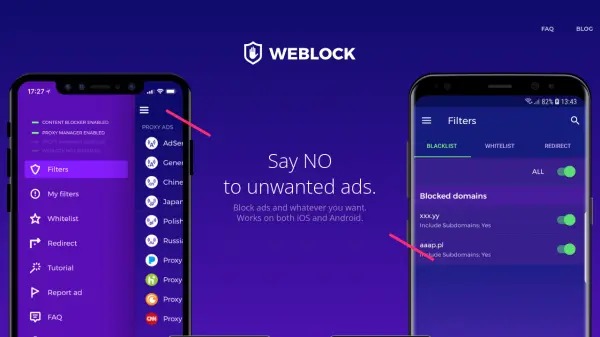
Weblock is a versatile ad-blocking and proxy management app designed for iOS and Android devices. It allows users to block a wide range of online content, including banner ads, pop-ups, video ads, and tracking scripts, when connected to Wi-Fi or cellular networks. With over 800,000 users worldwide, Weblock offers easy configuration through predefined lists, custom blacklists and whitelists, and the ability to import rules from EasyList or hosts files. The app also supports sharing configurations between devices via iCloud or export features, making it a comprehensive solution for a cleaner, faster, and more private browsing experience.
Features
- Ad Blocking: Blocks banners, pop-ups, and video ads in most browsers and apps.
- Content Blocking: Blocks unwanted content providers like Disqus, Gravatar, Outbrain, and ZergNet.
- Privacy Protection: Blocks tracking and statistical scripts to safeguard user privacy.
- Custom Rules: Allows creation of custom blacklists and whitelists for URLs, domains, or IPs.
- Predefined Lists: Offers predefined lists of ad servers and content providers for easy configuration.
- Import Rules: Supports importing rules from EasyList or hosts files on Android.
- Configuration Sync: Syncs settings between iOS devices via iCloud and shares configurations between Android devices via export.
- Proxy Management: Manages proxy settings with ease.
Use Cases
- Blocking intrusive ads while browsing on mobile browsers.
- Removing in-app advertisements on Android and iOS apps.
- Preventing online tracking and protecting privacy from tracking scripts.
- Blocking unwanted content widgets like comment sections and recommendation engines.
- Speeding up page load times by eliminating ad and tracker loading.
- Creating a custom ad-free experience by whitelisting specific sites to support them.
FAQs
-
Does Weblock work on cellular networks?
Yes, Weblock works on both Wi-Fi and cellular networks. On iOS, it works on cellular networks as well, while on Android it works when connected to Wi-Fi. -
Can I whitelist specific websites?
Yes, Weblock allows you to create a whitelist so that ads are allowed on specific sites you want to support. -
How do I sync my configuration across devices?
On iOS, you can sync configurations via iCloud. On Android, you can share settings using the export feature.