What is VebAPI?
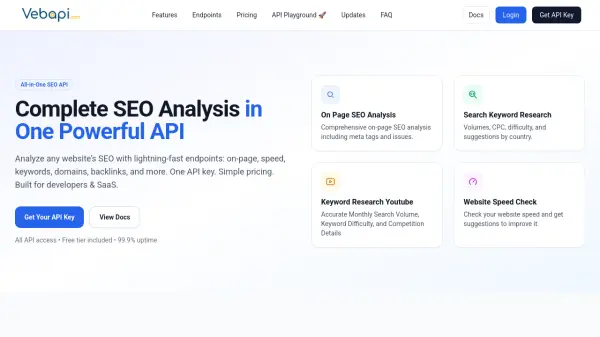
VebAPI offers a unified API solution for comprehensive SEO analysis, designed specifically for developers and SaaS platforms. The service provides multiple specialized endpoints that deliver detailed insights into website performance, including on-page SEO analysis with meta tags and issues, keyword research with volumes and competition data, website speed checks with improvement suggestions, domain data analysis, and backlink intelligence.
The platform features a developer-first approach with simple REST API architecture, clean JSON responses, and extensive documentation. It includes specialized endpoints for YouTube video analysis, utility tools like domain availability checking and website screenshots, and AI-powered features such as AI visibility audits and domain name generation. With enterprise-grade reliability, global CDN infrastructure, and real-time data updates, VebAPI enables developers to quickly integrate advanced SEO capabilities into their applications.
Features
- On Page SEO Analysis: Comprehensive on-page SEO analysis including meta tags and issues
- Search Keyword Research: Volumes, CPC, difficulty, and suggestions by country
- Website Speed Check: Check website speed and get suggestions to improve it
- Backlink Analysis: Backlink analysis including domain authority, referring domains, and link quality metrics
- AI Visibility Audit: Analyzes webpage to determine if content is AI-friendly and ready for AI SEO
- YouTube Keyword Research: Accurate Monthly Search Volume, Keyword Difficulty, and Competition Details for YouTube
- Domain Availability Checker: Domain name availability checker API with thousands of TLDs with real-time data
- AI Domain Generator: Generate available .com domain names with keywords using AI
Use Cases
- Integrating SEO analysis features into SaaS applications
- Building custom SEO tools for agencies and marketers
- Automating website performance monitoring and reporting
- Conducting competitive analysis for digital marketing campaigns
- Developing content optimization tools with keyword insights
- Creating backlink monitoring and analysis systems
- Building YouTube video optimization tools with keyword research
- Developing domain research and availability checking tools
FAQs
-
How quickly can I start using the API after signing up?
You can start making requests immediately after signing up and obtaining your API key, with no approval process required. -
Do I need separate API keys for different endpoints?
No, a single API key provides access to all available endpoints across the platform. -
What types of data categories are available through the API?
The platform offers SEO analysis endpoints with growing libraries across social media, email validation, text processing, and utility categories. -
Can I monitor my API usage and credit balance?
Yes, you can track real-time usage, view request logs, and check credit balances through your dashboard.