What is TraX?
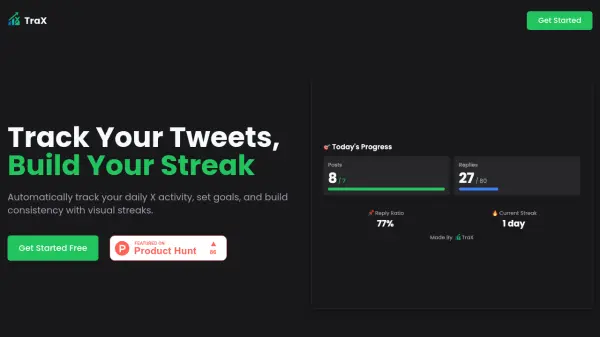
TraX streamlines social media consistency by automatically tracking daily posts and replies on X (formerly Twitter). Users can set personalized goals, monitor their streaks, and visualize their engagement trends through detailed charts and statistics. Instead of relying on manual tracking, this Chrome extension seamlessly connects to your X account and keeps you motivated with shareable results and a leaderboard within the TraX community.
The platform empowers users to identify activity patterns, optimize their posting strategies, and stay accountable with real-time updates and customizable targets. With features like community competition and visual progress monitoring, TraX enables content creators and community builders to maintain steady, measurable growth on X.
Features
- Customizable Goals: Set specific daily targets for posts and replies.
- Visual Progress: Monitor activity with clearly presented charts and streak displays.
- Build Streaks: Maintain and track ongoing daily posting streaks.
- Share Results: Capture and share screenshots of your statistics.
- Leaderboard: Compete with community members for added motivation.
- 7-Day Activity Trends: View weekly posting and reply patterns.
- Reply Ratio Monitoring: Analyze the balance of replies versus posts.
Use Cases
- Maintain and visualize daily X posting habits.
- Set and track custom audience engagement goals.
- Share progress and posting consistency with followers.
- Identify productive days to optimize social media strategies.
- Join community competitions for increased motivation.