What is toast.log?
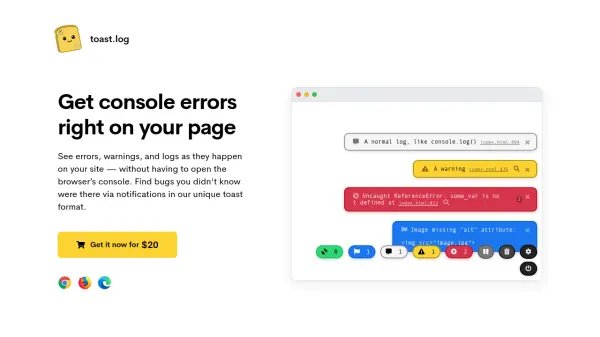
toast.log is a browser extension designed to enhance web development debugging by presenting console errors, warnings, logs, network requests, and SEO issues as real-time toast notifications directly on the page. It eliminates the need to open the browser's DevTools or console, allowing developers to monitor issues seamlessly while navigating websites. The tool works on any website, theme, or code without requiring script additions or code changes, and it functions offline, providing flexibility across development and production environments.
Users can control notifications by turning the extension on or off anytime or filtering specific log types such as errors, warnings, or logs. Features include error tracing with file names and line numbers, one-click Google search for error diagnosis, customizable toast appearance, expandable arrays and objects for debugging, and real-time network request monitoring. Additionally, it identifies SEO issues like missing image alt attributes or broken resources, helping improve website rankings. Notifications are only visible to the user, ensuring no impact on other website visitors.
Features
- Real-time Notifications: Displays errors, warnings, logs, network requests, and SEO issues as toast notifications on the page
- No Code Changes Required: Works on any website without adding scripts or modifying existing code
- User-Only Visibility: Notifications are only visible to the user, not other website visitors
- Filtering Capabilities: Allows filtering by log types such as errors, warnings, or logs
- Error Tracing: Shows file names and line numbers for errors to aid debugging
- One-Click Google Search: Includes a button to search errors on Google for quick diagnosis
- Customizable Settings: Adjust toast font-size, opacity, border-radius, and other appearance options
- Expandable Data View: Displays arrays, objects, and JSON as expandable elements for easier debugging
- Network Request Monitoring: Shows all network requests with URLs, methods, and responses in real-time
- SEO Issue Detection: Identifies issues like missing alt attributes on images or broken resources affecting search rankings
Use Cases
- Debugging JavaScript errors and warnings during web development
- Monitoring network requests and responses for API or data fetching issues
- Identifying and fixing SEO problems like missing image alt attributes or broken links
- Viewing console logs in real-time without opening browser DevTools
- Testing websites across different environments (development, production) with error tracking
- Improving website performance by detecting and resolving errors before users encounter them
- Assisting in troubleshooting contact forms or other interactive elements on websites
FAQs
-
How does toast.log work?
toast.log is a browser extension that listens to JavaScript functions like console.log(), console.error(), window errors, network requests, and more, displaying them as toast notifications in real-time on the page without opening the browser's DevTools. -
Can I control when and where I see the notifications?
Yes, you can add specific addresses and domains in settings for automatic activation, or manually turn it on/off by clicking the extension icon. It remains active until turned off or the tab is closed. -
What types of errors does toast.log detect?
It detects JavaScript errors, network request errors (POST, GET, etc.), DOM errors (e.g., broken images), console logs (log, info, warn, error), and SEO issues. -
Is there a list of supported browsers?
toast.log is developed and tested for Chrome, Firefox, and Edge, and may work on Chromium-based browsers. Safari support is planned, but Internet Explorer is unlikely. -
Will website visitors see the errors?
No, all extension features are only visible to the user. The website remains unchanged for other visitors, and notifications appear only when toast.log is activated.