What is TmuxAI?
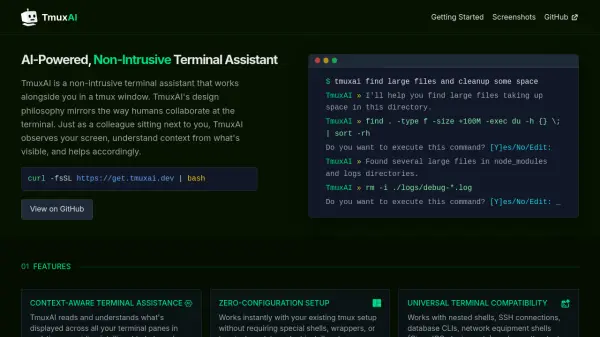
TmuxAI is an advanced AI assistant integrated directly into your tmux terminal environment. It monitors your terminal panes in real time, understands their context, and provides intelligent, context-sensitive help as you work. Designed to be non-intrusive, TmuxAI acts like a helpful colleague by suggesting commands, offering explanations, and assisting with complex tasks—without interfering with your standard workflow.
This tool stands out for its universal compatibility across terminal interfaces, including nested shells, SSH, and specialized network or database CLIs. Installation requires no configuration changes, and the open-source nature of TmuxAI allows users to freely adapt and customize it to their workflows, ensuring both accessibility and extensibility for developers and IT professionals alike.
Features
- Context-Aware Assistance: Reads all terminal panes in real-time to provide relevant help.
- Zero-Configuration Setup: Installs instantly without requiring special configurations or shells.
- Universal Terminal Compatibility: Works with nested shells, SSH, database CLIs, and more.
- Prepare Mode: Enhances command tracking and accuracy with custom prompts.
- Watch Mode: Proactively monitors terminal activity to suggest improvements or explanations.
- Open Source: Fully open-source for free usage and customization.
Use Cases
- Automating complex terminal tasks with intelligent command suggestions.
- Monitoring and managing server resources efficiently.
- Learning and executing new command-line operations with real-time assistance.
- Enhancing productivity for developers working in multi-pane terminal sessions.
- Providing safer command execution through confirmation prompts before running critical operations.
- Assisting with database or network equipment shell operations in real time.
FAQs
-
Does TmuxAI require any special configuration to start?
No, TmuxAI works instantly with your existing tmux setup and does not require any special shells, wrappers, or terminal emulators. -
Is TmuxAI compatible with SSH and database CLI sessions?
Yes, TmuxAI is universally compatible and works with SSH, database CLIs, network equipment shells, and any text-based terminal interface. -
Can I customize or adapt TmuxAI for my workflow?
Yes, TmuxAI is open source, allowing you to freely use, adapt, and extend its functionality to suit your specific needs.