What is TeachQuill?
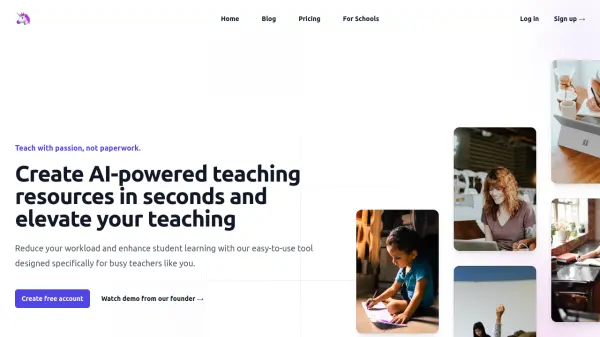
TeachQuill is a comprehensive AI teaching platform designed to reduce prep time and help educators produce classroom-ready materials faster. Covering every phase of instruction, it organizes more than 100 AI tools across five core workflows: Plan, Create, Teach, Assess, and Support. Teachers can describe their needs in plain language, and the platform automatically routes the request to the most appropriate tool, generating structured, standards-aligned outputs in seconds. Resources span lesson plans, worksheets, quizzes, rubrics, differentiated materials, IEP goals, behavior intervention plans, social stories, report card comments, and much more, all editable inline and exportable to PDF, DOCX, or Google Docs formats.
The platform is built for educators across every role and grade level, from kindergarten classroom teachers and special education specialists to ESL/ELL instructors, department heads, college faculty, and substitute teachers. TeachQuill supports major U.S. standards frameworks, including CCSS, NGSS, TEKS, AP, IB, WIDA, and C3, with alignment built directly into the generation model. It is FERPA and COPPA compliant by design, never storing students' personally identifiable information, making it suitable for use in U.S. school districts. A free tier with 30 daily credits is available with no credit card required, and a Pro plan as well as School and District plans, are offered for heavier usage and team collaboration needs.
Features
- 100+ AI Teaching Tools: Covers planning, material creation, engagement, assessment, and SPED support in one unified platform.
- Universal AI Input: Describe any task in plain language and the platform automatically routes it to the most appropriate tool.
- Standards Alignment: Built-in support for CCSS, NGSS, TEKS, AP, IB, WIDA, and C3 frameworks verified against official sources.
- Differentiated Instruction Generator: Creates multiple levels of the same material for below-grade, on-grade, and above-grade learners in seconds.
- IEP & SPED Support Tools: Generates IDEA-informed IEP goals, BIPs, 504 plans, social stories, and visual schedules without requiring student PII.
- Editable & Export-Ready Outputs: All generated content supports inline editing and can be downloaded as PDF, DOCX, or plain text.
- FERPA & COPPA Compliance: Student data is never stored or used for model training, meeting federal education privacy requirements.
- School & District Plans: Admin dashboards, usage analytics, SSO/DPA support, and shared school libraries for team-wide use.
Use Cases
- Generating standards-aligned lesson plans for K–12 subjects in under 60 seconds
- Creating differentiated worksheets at multiple reading or skill levels for diverse classrooms
- Writing SMART IEP goals, behavior intervention plans, and 504 plans for special education students
- Producing report card comments for an entire class quickly and efficiently
- Building rubrics and assessment checklists for essays, projects, and performance tasks
- Creating review games, Jeopardy boards, and exit tickets for classroom engagement
- Developing WIDA-aligned vocabulary worksheets and leveled passages for ESL/ELL students
- Mapping curriculum sequences and pacing guides for department-wide standards alignment
- Generating college syllabi, discussion questions, and essay rubrics for university faculty
- Creating self-contained substitute plans with step-by-step instructions and answer keys
How It Works
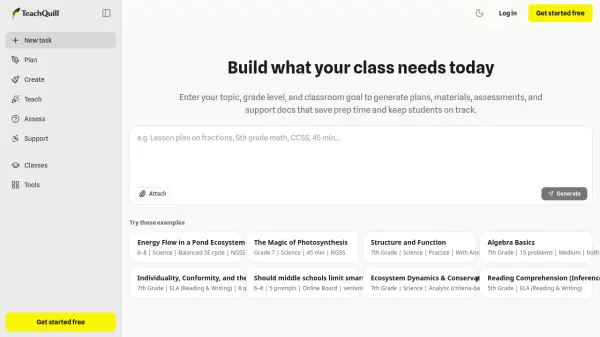
Describe What You Need
Type your topic, grade level, and classroom goal in plain language — for example, 'A 45-minute lesson on photosynthesis for 8th grade, NGSS aligned.' No templates or form-filling required.
AI Picks the Right Tool and Generates
TeachQuill analyzes your prompt, automatically routes it to the most appropriate tool from its 100+ AI teaching tools, and generates a structured, standards-aligned output in under 60 seconds.
Review and Edit
All generated outputs are fully editable inline. Review and refine the content to fit your specific classroom context, students, and instructional goals before using it.
Export and Use
Download your finished resource as a PDF, DOCX, or plain text file, or export directly to Google Docs or Slides. Resources are formatted and print-ready with no additional formatting work required.
FAQs
-
What grade levels does TeachQuill support?
TeachQuill supports educators across all grade levels, from kindergarten through college and university, including K–12 classroom teachers, special education specialists, ESL/ELL instructors, department heads, and college faculty. -
What US standards frameworks does TeachQuill support?
TeachQuill supports major U.S. standards frameworks including Common Core State Standards (CCSS), Next Generation Science Standards (NGSS), TEKS, AP, IB, WIDA, and C3. Alignment is built into the generation model itself and verified against official sources. -
Can TeachQuill be used by an entire school or district?
Yes. TeachQuill offers School and District plans that include custom seats and credits with volume pricing, an admin dashboard, seat management, usage analytics, SSO/DPA support upon request, shared templates, a school library, and a dedicated success manager. -
Do I need to enter student names or identifying information to use TeachQuill?
No. TeachQuill is designed so that you never need to input student personally identifiable information (PII). Tools like the IEP goal generator, report card comment generator, and behavior plan generator all work without any student identifying data. -
What export formats does TeachQuill support?
TeachQuill supports exporting generated content as PDF, DOCX, and plain text. Resources can also be exported to Google Docs or Google Slides, and shared via direct link for collaboration with co-teachers and administrators.