Spinel favicon

Spinel
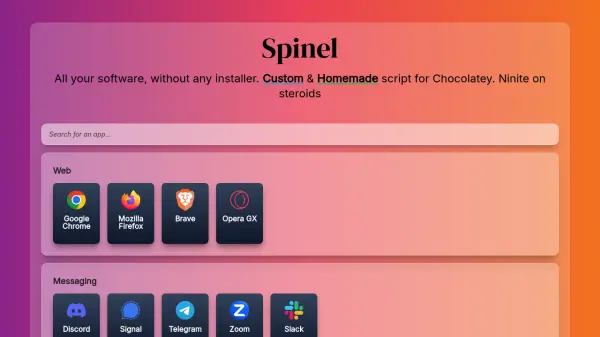
All your software, without any installer

What is Spinel?

Spinel is a web-based tool that provides a custom and homemade script for Chocolatey, allowing users to install multiple software applications simultaneously without needing individual installers. It functions as an enhanced version of Ninite, offering a streamlined approach to software installation on Windows systems.

The tool organizes software into categories such as web browsers, messaging apps, development tools, media players, image editors, utilities, and games. Users can select desired applications from these categories, and Spinel generates a script that automates the installation process through Chocolatey, saving time and reducing manual effort.

Features

  • Custom Chocolatey Script: Automates software installation through a homemade script
  • Bulk Installation: Enables simultaneous installation of multiple applications
  • Categorized Software List: Organizes applications into web, messaging, dev, media, image, tools, and games categories
  • No Individual Installers: Eliminates need for separate installer downloads
  • Streamlined Setup: Simplifies software installation process for Windows users

Use Cases

  • Setting up a new Windows computer with essential software
  • Quickly installing multiple applications for development work
  • Configuring software for media production or editing
  • Installing gaming platforms and related tools
  • Deploying standard software packages across multiple devices

Blogs:

  • Best ai tools for Twitter Growth

    Best ai tools for Twitter Growth

    The best AI tools for Twitter's growth are designed to enhance user engagement, increase followers, and optimize content strategy on the platform. These tools utilize artificial intelligence algorithms to analyze Twitter trends, identify relevant hashtags, suggest optimal posting times, and even curate personalized content.

  • Top 6 AI note-taking tools for 2026: in-person, online, and hybrid use cases

    Top 6 AI note-taking tools for 2026: in-person, online, and hybrid use cases

    Most AI note-taking lists are really lists of meeting bots, which join your video call and transcribe it. That's useful, but it's half the picture. Decisions happen in hallway conversations, client dinners, on-site visits, and hybrid rooms where nobody is on a video link. This guide covers different parts of the note-taking workflow: hardware capture for in-person settings, platform-native tools for online calls, and AI layers for organizing and synthesizing what you've captured. It compares six tools by capture context, workflow fit, pricing, and limitations.

  • Ghibli Art Generator AI tools

    Ghibli Art Generator AI tools

    List of the best AI tools to turn your photos into images that look like Studio Ghibli movies. Easy to use and fun for everyone.

Didn't find tool you were looking for?

Be as detailed as possible for better results