What is Solaracloud?
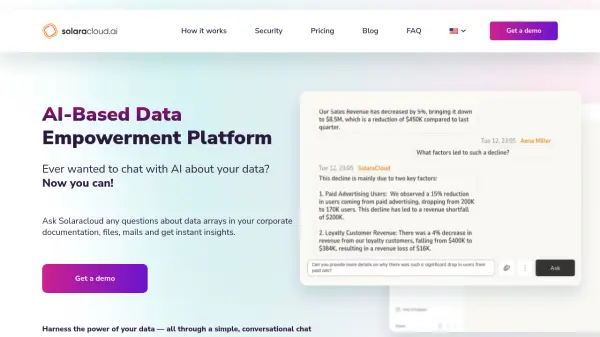
Solaracloud is an AI-powered data empowerment platform designed to streamline data interaction within corporate environments. It allows users to ask questions about data arrays in their documentation, files, and emails, and receive instant, insightful answers.
The platform offers unified access to various types of company data, providing a conversational interface that simplifies data retrieval, structuring, and analysis. Solaracloud prioritizes enterprise-grade security through features like read-only operation, isolated resource groups, and data encryption both at rest and in transit.
Features
- Unified Data Access: Access various company data types from a single platform.
- Conversational Interface: Retrieve and analyze data using simple chat questions.
- AI-Powered Assistance: Receive contextually relevant answers and insights.
- Personal Data Collections: Organize and manage specific datasets for personalized results.
- Enterprise-Grade Security: Benefit from read-only operation, data encryption, and isolated resource groups.
- Customizable Dashboards: Tailor the data displayed according to your needs.
- Seamless Data Integration: Works with Salesforce, Gmail, Google Drive, OneDrive, and many others.
- Multi-user chats: Robust user access management tools for large organizations.
Use Cases
- Streamline data analysis and reporting for businesses.
- Improve decision-making with enhanced data statistics.
- Facilitate in-depth data analysis for professionals working with large datasets.
- Enable seamless collaboration and sharing of insights within teams.
- Shorten sales cycles by providing quick access to critical data.
- Enhance legal research and case preparation.
- Generate personalized client proposals and document templates.
FAQs
-
Can Solara integrate with existing systems?
Yes, Solara is designed for high compatibility and can be integrated with existing systems through APIs and software development kits (SDKs). -
Can Solara be customized for specific business needs?
Absolutely! We start by conducting a thorough requirements analysis to understand your work processes, procedures and internal policies. We then identify the key areas where Solaracloud can provide the greatest impact, after which we install a tailored instance of Solaracloud to suit your specific needs. -
What are Personal Collections in Solara?
Personal Collections in Solara is a powerful feature designed to enhance the user experience by allowing individual users to manage their own sets of data and documents. -
How does Solara ensure data security?
Solara ensures data security through strong data encryption at rest and in transit, role-based access control (RBAC), and multi-factor authentication (MFA). -
How is data stored and processed in Solara?
With Solara, your data is kept safe with strong encryption that protects against unauthorized access. When processing your data, Solara uses a secure environment in the Azure cloud, ensuring that only authorized users have access to it. In addition, Solara’s read-only system further increases security by preventing data from being stored after receipt, minimizing the risk of disclosure.