What is SkyPlanner APS?
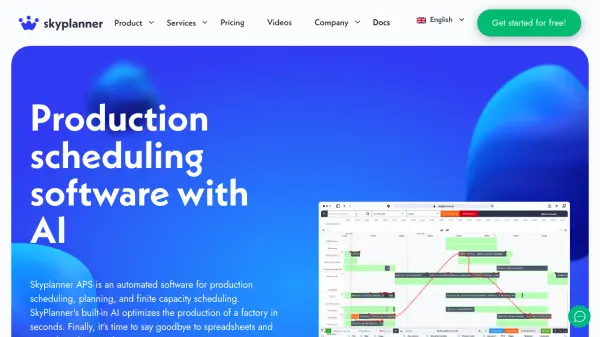
SkyPlanner APS revolutionizes production scheduling by leveraging built-in artificial intelligence to instantly calculate and optimize factory workflows. The AI-driven software seamlessly integrates with existing ERP and MES systems, delivering efficient scheduling, shift planning, and real-time production adjustments—all within an intuitive user interface.
Designed for factories of all sizes and industries, SkyPlanner APS minimizes human error, automates responses to disruptions, and ensures facilities operate at peak capacity. Users benefit from features like Gantt timeline visualization, dynamic shift management, and rapid adaptation to changes in production, enhancing delivery reliability and operational efficiency.
Features
- AI-Powered Optimization: Instantly calculates the most efficient production plans using artificial intelligence.
- Seamless ERP Integration: Connects to all ERP and MES systems for comprehensive production data synchronization.
- Gantt Timeline Visualization: Offers clear, visual tracking of production schedules and delivery phases.
- Dynamic Shift and Resource Planning: Facilitates accurate management of capacities and personnel shifts.
- Real-Time Time Logging: Allows production staff to log tasks in real time, visible across schedules.
- Multi-Facility Production Management: Manages and organizes production chains across multiple factories or subcontractors.
- Customizable Features: Offers customization for user-specific requirements and production processes.
- Intuitive User Interface: Enables fast and easy AI guidance and manual adjustments as needed.
Use Cases
- Optimizing manufacturing schedules for reduced lead times
- Managing production across multiple facilities or subcontractors
- Replacing manual spreadsheet-based planning with automated processes
- Adapting production quickly to equipment malfunctions or material shortages
- Enhancing on-time delivery performance for client orders
- Resource allocation and shift management for industrial staff
- Reducing inefficiencies and downtime in factory operations
FAQs
-
Can I change or cancel my subscription at any time?
If you are on a monthly billing plan, you can decrease or increase the number of workstations at any time and also cancel your subscription whenever you wish. -
Do I need to enter my credit card details to sign up?
No, credit card details are not required when registering. Billing information is only needed after the free trial period ends and you choose to continue using SkyPlanner. -
Can I try SkyPlanner before purchasing?
Yes, a 14-day free trial is available, allowing you to test all features without providing credit card details. -
Is it possible to get additional custom features for SkyPlanner?
Yes, additional custom features are available for an extra charge. Contact the sales team for more information. -
What limitations are there in the Trial version?
During the 14-day trial, you can add up to a maximum of 20 workstations to try SkyPlanner's basic features.