What is Shiki?
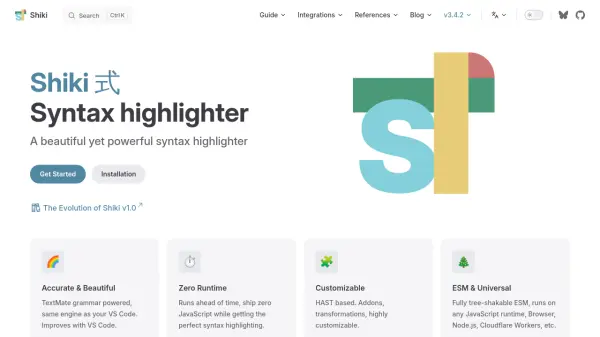
Shiki is an advanced syntax highlighter that leverages the power of TextMate grammars—the same technology used in Visual Studio Code—to provide precise and visually appealing code highlighting. Offering zero runtime requirements, Shiki generates highlighted code ahead of time, enabling developers to deliver fast and lightweight web experiences without shipping unnecessary JavaScript.
The tool is highly customizable thanks to its HAST-based architecture, supporting addons, transformations, and theme adjustments. Shiki is fully compatible with modern JavaScript runtimes—including browsers, Node.js, and cloud environments—making it an ideal choice for developers seeking flexible and performant syntax highlighting for documentation, blogs, and integrated developer tools.
Features
- TextMate Grammar Support: Utilizes the same grammar engine as Visual Studio Code for high accuracy
- Zero Runtime: Generates syntax-highlighted code ahead of time with no additional JavaScript shipped to clients
- Highly Customizable: HAST-based, enabling extensive theme and transformation options
- ESM & Universal Compatibility: Runs on Browser, Node.js, Cloudflare Workers, and other JavaScript platforms
- Integration Ready: Compatible with popular frameworks like markdown-it, Rehype, Monaco Editor, Next.js, and more
Use Cases
- Static site code highlighting for documentation platforms
- Real-time code snippets in blogging platforms
- Visual Studio Code-compatible theme application in web projects
- Integration within online code editors and playgrounds
- Enhanced code presentation in technical educational content
FAQs
-
What makes Shiki different from other syntax highlighters?
Shiki stands out for its use of TextMate grammars for highly accurate highlighting and its zero-runtime operation, which minimizes client-side resources. -
Is Shiki compatible with popular JavaScript frameworks?
Yes, Shiki is designed for integration with frameworks and libraries such as markdown-it, Rehype, Monaco Editor, Next.js, and more. -
Can I customize the highlighting themes in Shiki?
Shiki offers deep customization, including support for custom themes and transformations using its HAST-based architecture. -
Does Shiki work in browser and server environments?
Shiki runs universally on various JavaScript runtimes, including browsers, Node.js, and edge/computing platforms.