What is SculptGL?
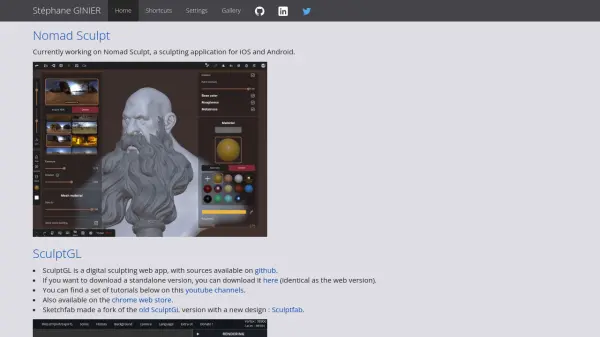
SculptGL is a comprehensive web-based digital sculpting application designed for artists and 3D modelers. It provides a suite of powerful sculpting tools, including brushes, inflate, smooth, twist, drag, and supports PBR vertex painting with control over color, roughness, and metalness. Users can leverage alpha textures for enhanced creativity and utilize multiresolution sculpting with advanced quad-tri subdivision capabilities. The application ensures sculpting flexibility through non-destructive navigation between different poly levels while retaining all changes.
SculptGL features voxel remeshing with SurfaceNets meshing algorithms, dynamic topology for real-time model adaptation, and a variety of import/export options supporting OBJ, PLY, and STL formats. The platform is optimized with algorithms for post and pre-transform cache efficiency, offers undo/redo support, and handles both high and low poly workflows. This makes it a robust solution for professionals seeking accessible and efficient digital sculpting directly in the browser.
Features
- Comprehensive Sculpting Tools: Includes brush, inflate, smooth, twist, drag, and more for detailed model creation.
- PBR Vertex Painting: Allows editing of color, roughness, and metalness properties for enhanced realism.
- Alpha Texture Support: Facilitates texture detailing for each sculpting tool.
- Multiresolution Sculpting: Enables navigation across poly levels while retaining edit changes.
- Quad-Tri Subdivision: Features Catmull-Clark and Loop subdivision algorithms.
- Voxel Remeshing: Utilizes SurfaceNets for quad-only mesh generation and uniform remeshing.
- Dynamic Topology: Real-time local subdivision and decimation with triangle-only topology.
- Robust Import/Export Options: Supports OBJ, PLY, and STL formats with vertex color reading.
- Undo/Redo Support: Offers flexible and safe workflow management.
Use Cases
- Creating detailed 3D models for games or films.
- Rapid concept sculpting and prototyping.
- Educational demonstrations for digital sculpting techniques.
- Texturing and painting high-resolution assets.
- Preparing 3D assets for 3D printing workflows.