What is rtrvr.ai?
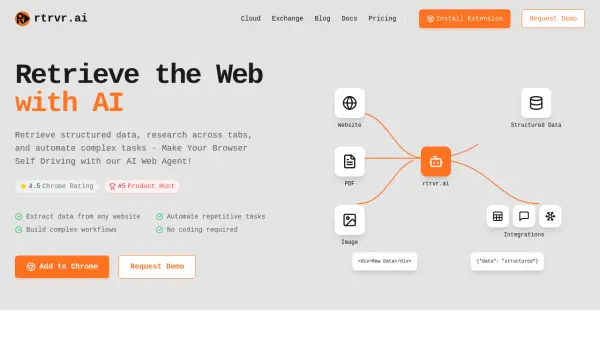
rtrvr.ai introduces an AI-powered web agent that operates within the user's Chrome browser to enhance productivity and streamline online workflows. It enables users to retrieve structured data from websites, perform research tasks across various open tabs, and automate complex, repetitive actions without requiring any coding knowledge. The tool is designed to function as a 'self-driving' browser assistant, handling intricate tasks efficiently.
Leveraging a unique DOM-only agent, rtrvr.ai performs operations securely and precisely within the browser environment. This approach allows it to access sites often blocked by cloud-based agents and ensures consistent automation through precise DOM-based recording. It supports parallel task execution across multiple tabs for increased speed and offers integrations with APIs and other tools, alongside pre-built workflows available on its exchange platform.
Features
- AI Web Agent: Automates tasks and data retrieval within the browser.
- Structured Data Extraction: Extracts data from any website into a structured format.
- Parallel Automation: Runs complex workflows across multiple tabs simultaneously.
- DOM-Powered Precision: Uses DOM-based recording and scraping for accuracy and reliability, even on non-English sites.
- Secure & Sandboxed: Operates with minimal permissions within the Chrome browser.
- Workflow Building: Allows users to create complex, multi-step automations without coding.
- Integrations: Connects to APIs and other tools like CRMs (e.g., HubSpot) and communication platforms (e.g., Slack).
- Pre-built Workflows: Offers ready-to-use automations via rtrvr.ai/exchange.
Use Cases
- Automating lead generation from platforms like LinkedIn.
- Conducting company and competitor research by enriching data.
- Automating customer and brand outreach via email or social messages.
- Extracting datasets from websites and exporting them to Google Sheets.
- Reading and filling PDF forms automatically.
- Generating dynamic dashboards with updated information (e.g., daily news).
- Integrating web data and actions with CRMs and other business tools.