What is Repetier-Host?
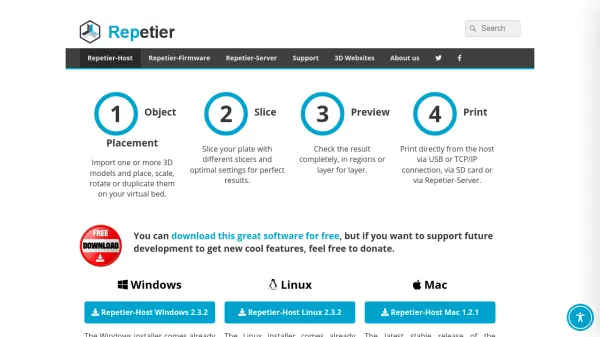
Repetier-Host is an all-in-one 3D printing software solution designed to manage the entire printing workflow from model import to final output. It supports object placement, scaling, rotation, and duplication on a virtual print bed, with slicing capabilities through integrated engines like Slic3r, CuraEngine, and Skeinforge. The software offers multi-extruder support for up to 16 extruders, enabling complex multi-material and multi-color prints with visual previews to identify potential issues before printing.
Users can control printers via USB, TCP/IP, or SD card connections, with additional features including Repetier-Server for remote access and management from any device. The software is compatible with most popular FDM 3D printers and includes tools for manual control, G-code editing, and velocity painting. It provides a user-friendly interface suitable for beginners while offering advanced controls for experienced users to optimize print quality with various filaments.
Features
- Multi Extruder Support: Handles up to 16 extruders with different filament types and colors, visualizing results before printing
- Multi Slicer Support: Includes Slic3r, Slic3r Prusa Edition, CuraEngine, and Skeinforge slicers, with option to use other slicers
- Easy Multi-Part Printing: Load or duplicate multiple models for simultaneous printing with manual or automatic positioning
- Remote Access and Control: Access and control printers from anywhere via Repetier-Server using a browser from any device
- Status Notifications: Receive push messages on smartphones/tablets for print events like pause, stop, finish, or errors via Repetier-Informer app
Use Cases
- Printing multi-material or multi-color 3D objects with multiple extruders
- Remote monitoring and control of 3D printers from different locations
- Simultaneous printing of multiple parts on a single build plate to save time
- Creating timelapse videos of 3D printing processes via webcam integration
- Calculating production costs before printing to optimize budget planning
FAQs
-
What operating systems does Repetier-Host support?
Repetier-Host is available for Windows, Linux, and Mac operating systems, with specific installation requirements for each platform. -
Can I use Repetier-Host with any 3D printer?
Repetier-Host works with almost all popular FDM (Fused Deposition Modeling) 3D printers, providing broad compatibility across different models. -
How many extruders can Repetier-Host support simultaneously?
Repetier-Host can handle up to 16 extruders with different filament types and colors, allowing for complex multi-material printing projects. -
What slicers are included with Repetier-Host?
Repetier-Host includes four different slicers: Slic3r, Slic3r Prusa Edition, CuraEngine, and Skeinforge, with the option to use additional slicers if needed. -
How can I access my 3D printer remotely using Repetier-Host?
You can access and control your printers remotely using Repetier-Server, which is included with Repetier-Host and accessible via a web browser from any device.