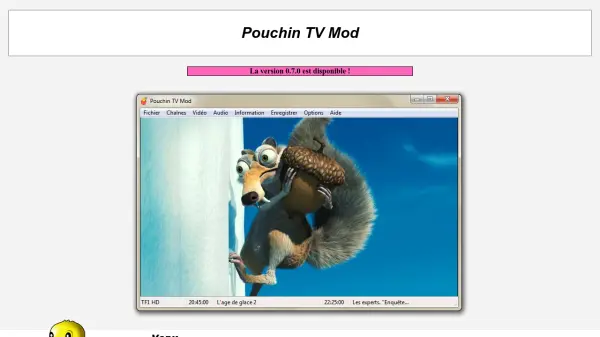
What is Pouchin TV Mod?
Pouchin TV Mod is a software application designed for watching and recording DVB-T (Digital Video Broadcasting - Terrestrial) television on Windows operating systems. It aims to provide a lightweight and fast interface, similar to legacy analog TV software like DScaler5 and K!TV, focusing on core functionalities such as viewing, recording, taking screenshots, and configuring codecs. The software supports dynamic audio track selection, simultaneous recording of all channels in a multiplex, and watching one channel while recording another from the same multiplex with a standard DVB-T card.
Optimized for French DVB-T broadcasting, it automatically retrieves channel numbers defined by the CSA. The latest version includes support for HD television and EAC3 (Dolby Digital Plus) audio, provided the user's computer has compatible codecs. It is written in C++ and relies entirely on DirectShow and installed codecs. Pouchin TV Mod is a modified version of the original Pouchin TV software, with ongoing development contributions.
Features
- Lightweight Interface: Provides a fast and minimalistic user experience similar to analog TV software.
- Recording Capabilities: Allows recording of channels, including simultaneous recording of all channels in a multiplex.
- HD and EAC3 Support: Compatible with high-definition television and Dolby Digital Plus audio formats.
- Dynamic Audio Selection: Enables switching between audio tracks for language changes or AC3 usage.
- Multiple Tuner Support: Can run multiple instances for different DVB-T tuners on the same computer.
Use Cases
- Watching live DVB-T television on a Windows PC.
- Recording television programs for later viewing.
- Capturing screenshots from TV broadcasts.
- Managing audio tracks during playback for multilingual content.
- Using multiple DVB-T tuners for simultaneous viewing and recording.