What is Photato?
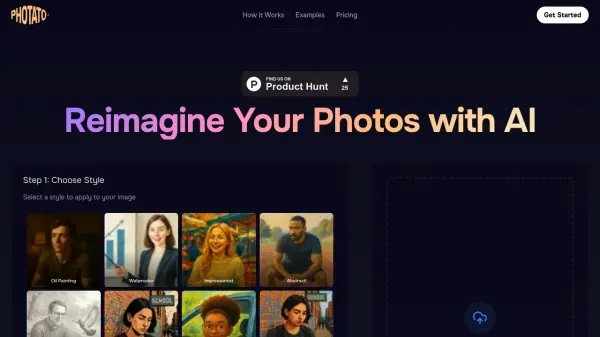
Photato is an AI-powered image transformation tool that allows users to reimagine their photos by applying various artistic styles. The platform uses artificial intelligence to convert ordinary images into stunning artwork in just a few simple steps. Users can upload their photos, choose from a wide range of styles including oil painting, watercolor, impressionist, abstract, pencil sketch, and many themed aesthetics, then generate the transformed image with a single click.
The tool supports JPG and PNG formats with files up to 10MB in size. After processing, users can download their newly styled photos in high resolution and share them on social media or with friends. Photato offers a credit-based payment system where users purchase credits to apply styles to their images, with different packages available for various usage needs.
Features
- AI Style Transfer: Applies artistic styles to photos using artificial intelligence
- Wide Style Selection: Offers numerous styles including oil painting, watercolor, impressionist, abstract, and themed aesthetics
- Simple Process: Three-step workflow of upload, choose style, and generate
- High Resolution Output: Downloads transformed images in high quality JPG or PNG format
- Credit-Based System: Pay-as-you-go pricing with credit packages for different usage levels
Use Cases
- Creating artistic versions of personal photos for social media
- Transforming portraits into painting-style artwork
- Generating themed character images for creative projects
- Producing stylized images for digital content creation
- Converting photos into various artistic mediums for personal enjoyment
FAQs
-
How does the pricing work?
Photato uses a credit-based system where users purchase credits to apply styles to their images. Credits are purchased in packages (Basic: €5 for 10 credits, Advanced: €20 for 50 credits, Pro: €50 for 150 credits) and can be used as needed without subscriptions. -
How do I use Photato?
Using Photato involves three simple steps: upload your photo, choose a style from the available options, and click generate to apply the style using AI technology. -
What kind of styles can I apply?
Photato offers a wide range of styles including artistic paintings (oil painting, watercolor), drawings (pencil sketch, comic book), digital graphics (pixel art, synthwave), crafts (claymation, LEGO), fantasy characters, sci-fi themes, historical figures, modern archetypes, photography styles, and themed aesthetics. -
Do I need an account to use this?
Yes, users need to sign in to purchase credits and use the Photato service for transforming their photos with AI styles. -
What happens to my uploaded photos?
The content does not specify what happens to uploaded photos after processing, but users can download their transformed images for personal use.