What is OldRoll?
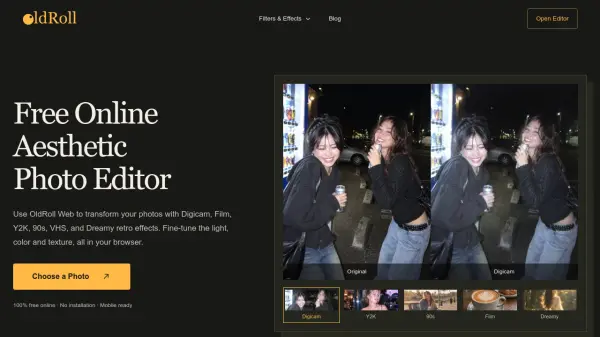
Transform everyday digital snapshots into nostalgic visuals directly inside any web browser. Users can apply a wide range of iconic camera looks, including classic digicam flash, disposable camera warmth, grainy 90s print textures, and dreamy light blooms without needing to install desktop software.
The editor provides granular controls for adjusting exposure, contrast, warmth, saturation, and lens blur alongside side-by-side original comparisons. In addition to standard photo adjustments, users can layer film frames, grain, light leaks, and customizable date stamps, or assemble multiple pictures into retro grid and photo strip collages.
Features
- Retro Camera Filters: Recreates iconic aesthetics including Digicam, Film, Y2K, 90s, VHS, Polaroid, and Dreamy filters.
- Manual Light and Focus Adjustments: Enables fine-tuning of exposure, contrast, warmth, saturation, and lens blur with original image comparison.
- Vintage Overlays and Frames: Allows layering of film frames, flashes, grain, light leaks, and stickers onto images.
- Photo Collage Maker: Arranges single or multiple photos into vintage photo strips and grid layouts with solid, gradient, or textured backgrounds.
- Customizable Date Stamps: Features vintage pixel-style timestamps and configurable date stamp settings.
Use Cases
- Giving social media posts, photo dumps, and reel covers a consistent camera-inspired aesthetic.
- Applying film and disposable-camera effects to daylight portraits, travel scenes, and street photography.
- Designing Y2K, street, and lo-fi visuals for subculture content.
- Transforming product and lifestyle photos into warm campaign visuals for online stores.
- Creating vintage cover art, backstage teasers, and promotional materials for music creators.
- Adding dreamy, VHS, or direct-flash effects to cosplay and convention photos.
How It Works
Upload a Photo
Choose a portrait, street scene, or travel photo from your mobile device or computer.
Choose a Retro Look
Select a style such as Digicam, Film, Y2K, Disposable Camera, 90s, VHS, or Dreamy, and adjust the effect intensity.
Download and Share
Compare the edited picture with the original, preview the finished result, and save your photo.
FAQs
-
Can I edit photos already in my phone gallery?
Yes. In your mobile or desktop browser, select Choose a Photo to upload and edit an existing picture from your device. -
What is the difference between Camera and Filter resources?
Camera resources recreate a fuller camera character, while Filters are focused looks that can be applied and adjusted inside the editor. -
How can I give my photos a warm 90s look?
Start with a daylight portrait, picnic, or travel snapshot, then choose a 90s look for warm yellow tones, faded shadows, and an aged-print finish while keeping skin tones natural. -
Which photos work best with a Dreamy filter?
Portraits with backlight or side light, visible hair edges, and bright highlights work best, as the Dreamy effect softens highlights into a gentle glow. -
Can I change the timestamp on a retro photo?
Yes, OldRoll supports customizable date stamps that can be configured within the selected camera settings in the online editor.