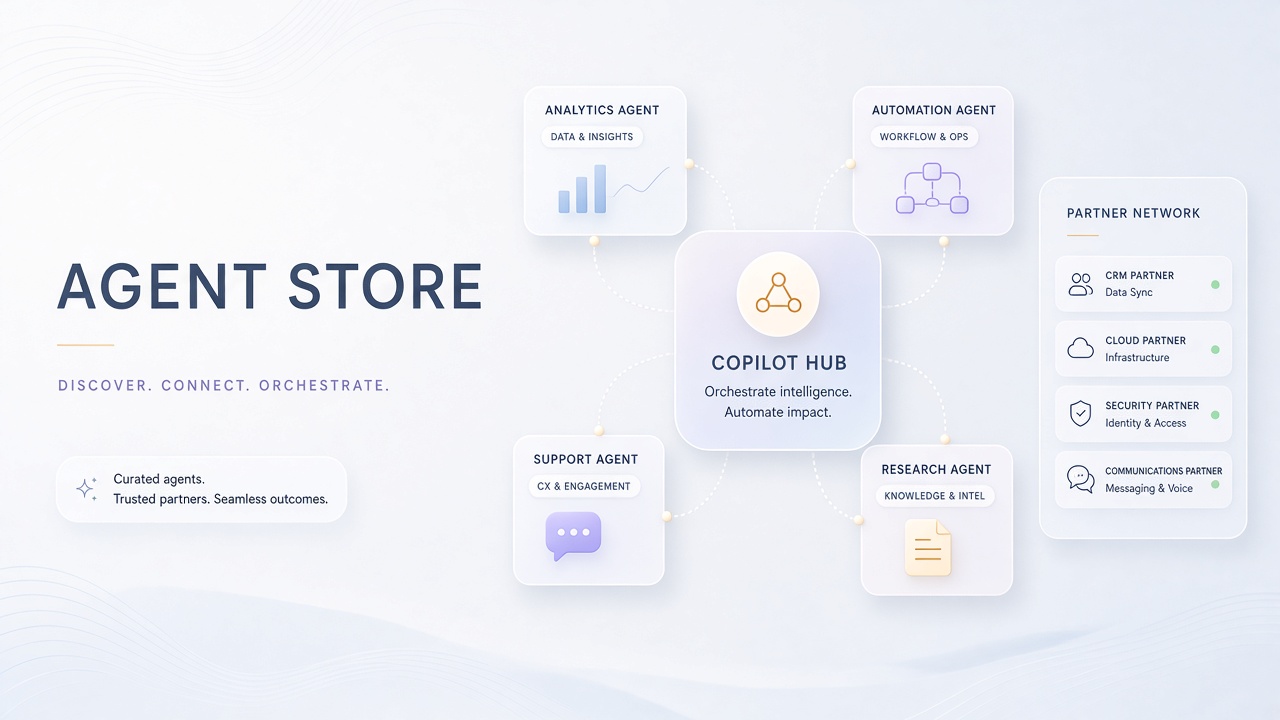
Microsoft expanded its agent ecosystem in 2026 by linking Copilot Studio publishing workflows to the Microsoft 365 Agent Store and Microsoft Marketplace. The copilot studio agent marketplace gives enterprises a curated catalog of Microsoft-built agents, verified partner solutions, and internal bots built by their own makers. IT administrators retain approval authority before agents reach end users in Teams, Outlook, Word, Excel, and PowerPoint.
This analysis covers marketplace launch mechanics, partner categories, admin approval policies, pricing models, and procurement implications for teams evaluating AI chatbot and AI code agents inside Microsoft tenants. It draws on Microsoft Learn documentation, the Agent Store practical guide, and partner showcase listings verified in September 2026.
Marketplace Launch Details and Unified Catalog
The Microsoft 365 Agent Store launched in May 2025 as an in-product discovery hub, and Microsoft Marketplace serves as the web-facing transact layer for the same agent catalog. Both surfaces share unified listings, pricing metadata, and publishing infrastructure. Employees discover agents inside Copilot while procurement teams research and purchase on Marketplace.
Copilot Studio remains the native authoring environment for custom multitenant agents. Partners submit agents through Microsoft Partner Center. Internal makers publish to an organizational catalog that requires admin review in the Microsoft 365 admin center before store-wide availability. Microsoft Agent 365 SDK enables external agents built on Azure AI Foundry, OpenAI Agents SDK, or custom code to appear in the "Agents for your team" collection without a full rebuild.
| Distribution path | Who builds | Approval gate | Reach |
|---|---|---|---|
| Prebuilt Microsoft agents | Microsoft | Admin deploys from catalog | Tenant-wide after IT enablement |
| Partner marketplace agents | ISV partners via Partner Center | Commercial listing plus tenant admin | Cross-tenant via Marketplace |
| Internal Copilot Studio agents | Citizen developers, ops teams | Maker submit, admin approve | Organization catalog only |
| Agent 365 SDK integrations | Pro-code developers | Admin onboarding review | Curated team collection |
Microsoft positions the Agent Store as a curated experience, not an open app bazaar. Personalized discovery surfaces agents based on user work context. Verified third-party agents carry additional review badges intended to reduce security and compliance risk for regulated buyers.
Partner Categories in the Agent Store
Partner agents in the Microsoft agent store span sales, HR, finance, customer service, security, and industry verticals such as healthcare and manufacturing. The public Agent Showcase highlights solutions from Clay (GTM prospecting inside Copilot), Figma (diagram generation in Teams), ServiceNow, Adobe, and dozens of ISVs building on Copilot Studio and Agent 365.
Partner categories map to common enterprise workflows rather than raw model capabilities. Sales agents enrich CRM records and draft outreach. HR agents answer policy questions with permission-aware document retrieval. Security agents integrate with Microsoft Defender for investigation assistance. Industry agents add compliance templates and domain-specific connectors.
- Productivity and collaboration: Meeting prep, document summarization, project tracking
- Customer experience: Contact center voice agents, case routing, knowledge base Q&A
- Revenue operations: Pipeline scoring, account research, quote assistance
- IT and security: Ticket triage, access reviews, threat correlation
- Industry-specific: Clinical documentation, supply chain alerts, regulatory filing prep
Partners building multitenant agents for commercial distribution must use Copilot Studio custom agents (not declarative agents) and submit through Partner Center. Declarative agents support organizational catalog distribution but cannot reach the commercial Marketplace as of September 2026.
Admin Approval and Agent Governance Policies
Every agent reaching organizational users passes through Microsoft 365 admin center review, regardless of whether the agent originated internally or from the partner marketplace. Administrators control which agents appear in the tenant catalog, who can install them, and whether sideloading for personal use is permitted.
Agent 365 governance adds Entra-backed identity, permission-aware Microsoft Graph data access, observability hooks, and cross-surface notifications. IT teams can block unapproved agents, require certification for MCP tool servers, and export telemetry to Azure Application Insights. Copilot Studio environment-level policies restrict connector usage, generative answers, and authentication modes.
- Maker or partner submits agent for organizational or commercial listing
- Admin reviews data access scopes, connector permissions, and compliance attestations
- Approved agents publish to Agent Store catalog visible to designated user groups
- Ongoing monitoring via Agent 365 registry and Defender integration flags anomalous behavior
Enterprises adopting the m365 agent ecosystem should document an agent intake checklist parallel to SaaS procurement: data residency, PII handling, model provider subprocessors, and incident response contacts. Agents with write access to production systems warrant higher scrutiny than read-only Q&A bots.
Pricing Models for Marketplace Agents
Partner agent pricing on Microsoft Marketplace follows standard cloud marketplace mechanics: per-user subscriptions, consumption meters, or bundled SKUs alongside existing Microsoft agreements. Microsoft does not publish a universal revenue-share percentage in public documentation; partners negotiate commercial terms through Partner Center and co-sell programs.
Base Microsoft 365 Copilot licensing remains separate from third-party agent fees. Copilot Studio itself bills through Power Platform capacity (messages, sessions) and premium features such as generative answers and computer-use agents. Work IQ organizational context carries usage-based billing independent of base Copilot seats when custom agents query email, calendar, or files at scale.
| Cost layer | Typical billing unit | Buyer notes |
|---|---|---|
| M365 Copilot license | Per user per month | Required for most Agent Store experiences |
| Copilot Studio capacity | Messages, sessions, premium features | Applies to custom and partner-built bots |
| Partner marketplace agent | ISV-defined subscription or usage | Listed on Marketplace, transacted via EA or CSP |
| Work IQ context | Usage-based meter | Additional charge for Graph-heavy agents |
Procurement teams should request total cost of ownership estimates that include Copilot seats, Power Platform capacity, partner subscription fees, and Azure consumption for agents using Foundry models or custom inference endpoints behind Agent 365 connectors.
Frequently Asked Questions
What is the difference between Agent Store and Microsoft Marketplace?
Agent Store is the in-product discovery surface inside Microsoft 365 Copilot. Microsoft Marketplace is the web destination where IT buyers research, trial, and purchase the same agent listings. Both share one catalog and publishing pipeline.
Can partners sell Copilot Studio agents to external customers?
Yes, through Microsoft Partner Center commercial listings. Multitenant custom agents built in Copilot Studio can reach Teams and Microsoft 365 Copilot channels after partner certification. Declarative agents remain limited to organizational distribution.
Do admins have to approve every agent installation?
Policy varies by tenant configuration. Administrators can allow personal sideloading, require approval for organizational catalog entries, and block unlisted agents entirely. Enterprise deployments typically require admin approval for store-wide availability.
How does Agent 365 differ from Copilot Studio?
Copilot Studio is the authoring platform. Agent 365 is the governance and integration layer that adds Entra identity, Graph permissions, observability, and registry management for agents whether built in Copilot Studio or imported from external platforms.
Which internal link targets help evaluate agent vendors?
Browse AI chatbot tools for conversational patterns and AI code assistants when agents include developer workflows or MCP tool integrations.