What is Notyfy?
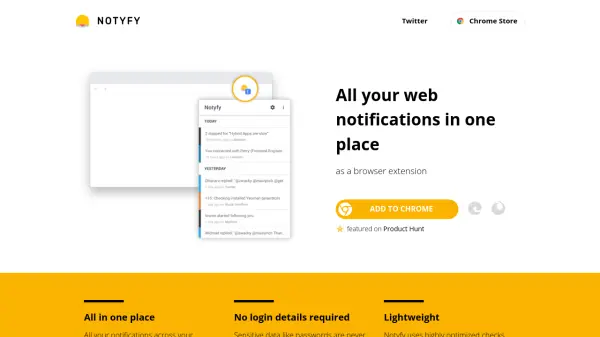
Notyfy is a browser extension for Chrome that brings all your web notifications together in one place. It supports a wide range of platforms including Facebook, Twitter, Reddit, Gmail, Medium, StackOverflow, Quora, LinkedIn, GitHub, and Product Hunt. The extension periodically checks for new notifications from platforms you are logged into, displaying them in a clean, unified interface. Clicking a notification takes you directly to the platform and the specific content. Notyfy is designed to be lightweight, using highly optimized checks that consume minimal bandwidth—for example, fetching Facebook notifications requires only 0.7kb to 58kb compared to the ~25mb of a full Facebook page load. Your sensitive data, such as passwords, are never read or stored, and no permissions are granted to read all your site data. Notifications are cached locally for faster loading, and nothing is stored on external servers.
Features
- Unified Notification View: All notifications from supported platforms displayed in one place.
- Direct Link Out: Clicking a notification redirects you to the platform and the specific content.
- No Login Details Required: Sensitive data like passwords are never read or stored.
- Lightweight: Highly optimized checks use minimal bandwidth, e.g., Facebook checks are 0.7kb to 58kb.
- Local Caching: Notifications are cached locally for faster loading; no server storage.
- No Full Site Data Access: Only reads data from supported platforms, not all site data.
Use Cases
- Managing notifications from multiple social media accounts without opening each site.
- Staying updated with Gmail, Twitter, and LinkedIn messages in one extension.
- Saving bandwidth by using lightweight notification checks instead of full page loads.
- Quickly accessing Reddit, Quora, or Medium updates without multiple tabs.
- Monitoring GitHub notifications for repository activities.
FAQs
-
How does Notyfy work?
Notyfy periodically checks for notifications from platforms you are logged into. Since the request comes from the Chrome Extension through your browser, the requests are identified as you and can check your notifications. The checks are super lightweight, ranging from 0.7kb to 58kb, compared to full page loads like Facebook's ~25mb. -
Does Notyfy store anything of me?
Nothing is stored on servers. The only thing being locally stored for caching purposes are your notifications for a faster loading time. -
Can Notyfy read all of my data?
No, Notyfy only reads the data of the platforms it supports. There is no permission given to read all your site data.