What is NexHealth?
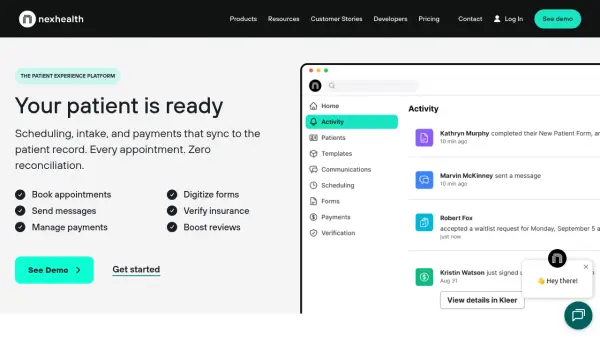
NexHealth provides a comprehensive patient experience platform designed to streamline operations for medical and dental practices. The platform automates critical administrative tasks including online appointment booking, patient communication through messaging and reminders, digital form management, secure payment processing, and insurance verification. Built on the NexHealth Synchronizer technology, it integrates directly with numerous health record systems to enable real-time data synchronization without disrupting existing workflows.
The solution helps practices reduce manual workload, improve patient satisfaction, and increase operational efficiency by digitizing traditionally paper-based processes. Practices can customize their implementation to match specific operational needs while maintaining compliance with healthcare regulations including HIPAA requirements.
Features
- Online Booking: Syncs directly to health record systems for real-time appointment management
- Digital Forms: Eliminates paper forms with customizable digital intake solutions
- Automated Communications: Sends appointment reminders, messages, and review requests via text and email
- Secure Payments: Enables online billing and collections with auto-posting to practice ledgers
- Insurance Verification: Confirms patient insurance eligibility in seconds with on-demand verification
- Waitlist Management: Fills last-minute appointment openings automatically
- Campaign Management: Allows practices to market services through targeted patient communications
- One-Click Recalls: Simplifies patient recall booking with single-click functionality
Use Cases
- Automating appointment scheduling and reducing no-shows
- Digitizing patient intake forms and medical history collection
- Streamlining patient communication through automated messaging
- Improving payment collection with online billing options
- Verifying insurance eligibility before patient appointments
- Managing patient waitlists to fill last-minute openings
- Running marketing campaigns to existing patient bases
- Collecting and managing patient reviews and feedback
FAQs
-
What billing options are available for NexHealth?
NexHealth offers both month-to-month and yearly subscription options. Monthly plans charge every month, while annual plans require full payment upfront. -
Are there cancellation fees for NexHealth services?
There are no cancellation fees. Users need to provide notice before their next billing cycle for monthly contracts or 90 days prior notice for annual contracts. -
Can practices use NexHealth while still under contract with another vendor?
Yes, NexHealth offers contract buyout options for existing vendor contracts, though exclusions may apply. Users should speak with a representative for details. -
Can additional practice locations be added to an existing NexHealth account?
Yes, practices can add more locations at any time by contacting their sales representative to upgrade their package.