What is Miniflux?
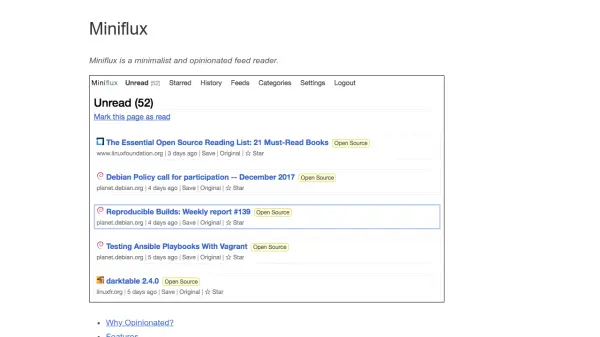
Miniflux is a minimalist and opinionated feed reader designed to provide an optimized reading experience. It focuses on simplicity by eliminating bloated features, ensuring that the content remains the most important aspect. The application enhances readability through carefully chosen page layouts, fonts, and colors, and it automatically fetches original article contents for feeds that display only summaries.
This tool guarantees user privacy by removing pixel trackers, eliminating tracking parameters from URLs, using a media proxy to prevent third-party tracking, and not forwarding any referrer. It operates without telemetry or advertising, offering a fast and efficient interface with keyboard shortcuts for navigation. Miniflux is free, open-source, and self-hosted, with easy installation via static binaries, RPM/Debian packages, or Docker images.
Features
- Optimized Readability: Enhances screen readability with chosen layouts, fonts, and colors.
- Privacy Protection: Automatically removes pixel trackers and tracking parameters, uses a media proxy, and avoids telemetry.
- Fast Navigation: Includes keyboard shortcuts for efficient browsing through unread items.
- Simple Installation: Compiled statically with no external dependencies, available as binary, package, or Docker image.
- Open Source: Distributed under the Apache 2.0 License, free and self-hosted.
Use Cases
- Reading RSS feeds in a clutter-free environment.
- Protecting privacy while consuming online content.
- Managing subscriptions efficiently with keyboard shortcuts.
- Self-hosting a feed reader for personal or organizational use.
- Avoiding advertisements and telemetry in feed reading.