What is Make3D?
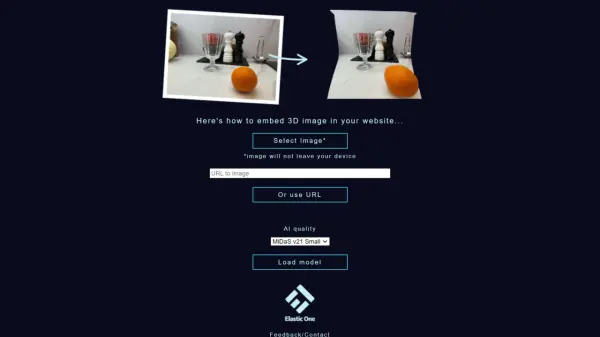
Make3D is an innovative web application that leverages artificial intelligence to transform standard two-dimensional images into three-dimensional representations. The tool uses the MiDaS AI model to analyze and extract depth information from uploaded images, creating a more immersive visual experience.
The platform offers user-friendly features including direct image uploads, URL-based image processing, and options to share or embed the resulting 3D images on websites. Users can choose between two AI model qualities: MiDaS v21 Small for faster processing or MiDaS v21 Large for enhanced results, all while ensuring privacy as images are processed locally on the user's device.
Features
- Local Processing: Images remain on user's device for privacy
- Multiple Input Options: Support for direct uploads and image URLs
- Sharing Capabilities: Generate shareable links and embed codes
- Quality Settings: Choice between MiDaS v21 Small and Large models
- Web Integration: Embed 3D images on websites
Use Cases
- Creating 3D versions of product photos
- Enhancing web content with 3D visuals
- Converting personal photos into 3D images
- Adding depth to digital art
- Creating immersive website galleries
FAQs
-
Is my image data secure when using Make3D?
Yes, all image processing is done locally on your device, and images never leave your computer. -
What's the difference between MiDaS v21 Small and Large models?
MiDaS v21 Small offers faster processing while Large provides better quality results but takes longer to process. -
How can I share my 3D images?
You can generate shareable links or embed codes after uploading your image to a hosting service like imgur.com.