What is Magic Number?
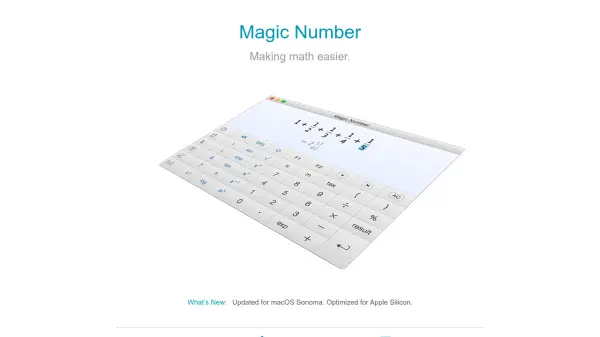
Magic Number is an advanced calculator application for macOS that streamlines both basic and complex mathematical calculations for greater productivity. Featuring a visually appealing interface, users can enter equations naturally—just as they would write them on paper—and receive clear, beautifully rendered results. Designed with everyday usability in mind, the app makes use of keyboard shortcuts and customization options to speed up workflow, allowing editing, browsing history, and exporting results as scalable PDFs.
Supporting over 100 mathematical and scientific functions—including arithmetic, trigonometry, statistics, linear regression, combinatorics, and more—Magic Number is suitable for students, engineers, professionals, and anyone needing quick, accurate calculations. The app supports multiple numeral bases, variable-like memories, customizable tax rates, and offers precise outputs with up to 25 digits of precision, making it an indispensable tool for math tasks on macOS.
Features
- Natural Math Input: Enter math expressions as you would write them, with intuitive syntax.
- Visually Clear Output: Beautiful and legible rendering of calculations and results.
- Comprehensive Function Support: Over 100 functions covering arithmetic, statistics, trigonometry, combinatorics, and more.
- Customizable Shortcuts: Global and in-app shortcuts, including one-finger typing with Double Key.
- PDF Export: Export expressions and results as scalable, high-quality PDFs.
- Multiple Numeric Formats: Supports decimal, binary, octal, hexadecimal, fractions, and more.
- Variable-Like Memories: Save and reuse up to 10 variables for ongoing calculations.
- Precision and Capacity: Handles calculations with up to 25 digits of precision.
- Tax/Percentage Tools: Includes special tax and percentage functions for everyday use.
- Date and Time Calculations: Calculate durations, day of the week, and timecode with conversions.
Use Cases
- Performing everyday arithmetic calculations quickly and efficiently.
- Solving advanced mathematics problems, including trigonometry and engineering calculations.
- Creating and exporting beautiful calculation records for reports or presentations.
- Handling business computations like tax, discounts, and percentage changes.
- Conducting statistical analysis and linear regression for academic or professional needs.
- Performing combinatorics calculations for mathematics or computer science projects.
- Carrying out date and time calculations for scheduling and planning.
- Utilizing scientific constants and precise numbers for research and study.
FAQs
-
What operating system does Magic Number support?
Magic Number is compatible with Mac computers running macOS 10.11 or later. -
Can I export my calculations?
Yes, Magic Number allows you to export your expressions and results as scalable PDF files. -
Is Magic Number suitable for advanced mathematics?
Yes, the app supports a wide range of advanced mathematical and scientific functions, including statistics, trigonometry, linear regression, and more. -
Is there a way to customize shortcuts and input methods?
Magic Number offers global and in-app shortcut customization, including an option for rapid, one-finger typing with Double Key.