What is MackerNews?
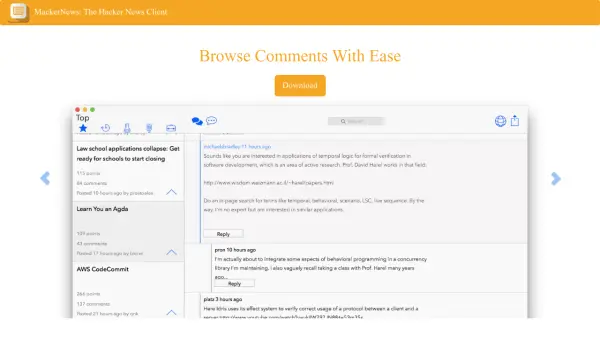
MackerNews is a specialized desktop client designed to enhance the Hacker News browsing experience. It transforms the standard interface into a more visually appealing and user-friendly format, making it easier to read articles and navigate discussions. The tool focuses on improving readability and accessibility for users who regularly engage with Hacker News content.
Key functionalities include secure local storage via Mac's Keychain Access, native sharing features, and real-time updates on trending stories. It supports full interaction with the Hacker News platform, allowing users to submit articles, vote, reply, and post comments directly through the client. The interface is optimized for efficient navigation, including arrow key controls for moving through nested comments seamlessly.
Features
- Beautiful Readable HN Articles: Transforms Hacker News articles into a visually appealing and easy-to-read format
- Easily Submit Articles to HN: Enables users to submit articles directly to Hacker News through the client
- Browse Comments With Ease: Provides an intuitive interface for navigating and reading comments
- Vote, Reply, & Post Comments: Supports full interaction with Hacker News discussions
- Trending Stories in REAL TIME: Offers real-time updates on trending stories from Hacker News
- View nested comments with ease: Allows easy navigation of nested comment threads using arrow keys
- Secure Login via Keychain Access: Uses Mac's Keychain Access for secure, locally encrypted login storage
- Share articles with ease: Includes native sharing features for quickly sending articles to others
Use Cases
- Browsing Hacker News articles in a more readable format
- Submitting articles to Hacker News efficiently
- Engaging with Hacker News discussions through voting and commenting
- Keeping up with trending stories in real-time
- Sharing interesting articles from Hacker News with others