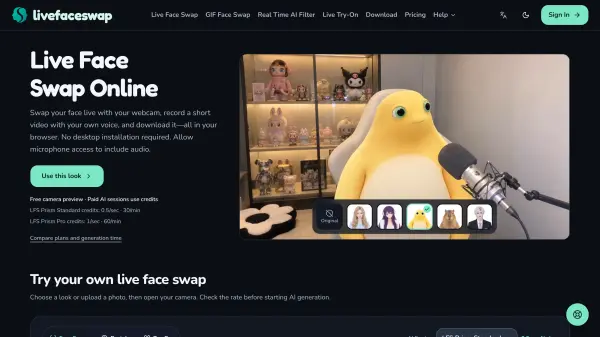
What is Live Face Swap?
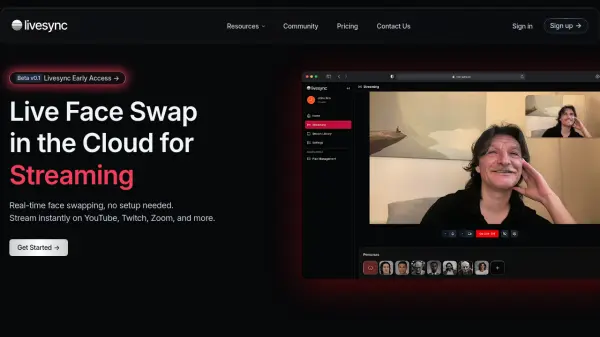
Live Face Swap is a cloud-powered web application that modifies live webcam video in real time using reference photos or preset characters. Operating directly within desktop browsers such as Chrome and Edge, the platform eliminates the need for local software installation or high-end graphics hardware. Users can preview their camera for free, select between the LFS Prism Standard and LFS Prism Pro engines, and apply full character replacements, real-time visual filters, or live garment try-ons.
In addition to live webcam transformations, the platform provides tools for single-face GIF creation and existing MP4 video face swapping. Live sessions automatically record the generated output locally in the browser, allowing users to replay and download their clips in supported formats like MP4 or WebM. The workspace also supports streaming output to external applications such as OBS Studio and Google Meet, alongside built-in session diagnostics that monitor network performance and connection metrics.
Features
- Browser-Based Live Face Swapping: Transforms live webcam feeds in real time using cloud processing with no desktop installation or dedicated GPU required.
- Dual AI Engines: Offers LFS Prism Standard at 0.5 credits per second and LFS Prism Pro at 1 credit per second for Face Swap, Restyle, and Try-On.
- Real-Time AI Filter (Restyle): Applies anime, cartoon, and other visual styles across the entire live camera scene.
- Live Virtual Try-On: Enables users to select a garment reference and preview how outfits look in motion via webcam.
- Local Recording and Downloads: Automatically records live generated output in the browser with optional microphone audio and saves clips in MP4 or WebM formats.
- OBS Studio and Google Meet Integration: Routes live transformed webcam output to Google Meet web sessions or OBS Studio via browser source and window capture.
- GIF and Video Face Swap: Provides dedicated tools for creating personalized single-face reaction GIFs and editing faces in existing MP4 videos.
- Camera Checks and Session Diagnostics: Displays real-time session status, received video dimensions, transport FPS, packet loss, and RTC media delay.
Use Cases
- Rehearsing on-camera characters for skits, role-play sessions, and short performances
- Exploring creative personas and visual storytelling concepts on webcam
- Practicing speaking, dialogue delivery, and facial expressions with local playback review
- Streaming live AI-transformed webcam feeds into OBS Studio or Google Meet
- Previewing clothing outfits in motion using live virtual try-on
- Applying real-time anime or cartoon filters to live video recordings
- Generating personalized single-face reaction GIFs
How It Works
Choose a reference look
Select a preset character or upload an authorized photo, then choose your AI engine before opening the camera.
Preview your camera and start face swap
Click Open camera to check your framing, sign in, review the displayed credit rate, and click Face Swap to begin AI generation.
Record, replay, and save
Allow microphone access to include your voice while recording starts automatically with the live output. Click End session, wait for the clip to finish preparing, and then replay and download the video before closing the tab.
FAQs
-
Can I try Live Face Swap before buying credits?
Camera preview is always free. When the trial is open and daily spots remain, users can sign in with a verified account, select LFS Prism Standard, and choose a Face Swap preset to see up to 10 seconds of results within a 30-second session budget without using wallet credits. -
When does credit billing start and stop during a live session?
Billing begins when the real-time connection is established and stops when it disconnects, including startup time before the first generated frame. Stopping only the recording does not stop credit usage; you must end the session to stop generation, and unused reserved credits return after settlement. -
What file formats and specifications are accepted for reference photos?
Reference photos should be clear, well-lit images with one visible face and no heavy shadows or covered features. Accepted formats are JPG, PNG, and WebP, up to 4 MB in file size and 16 megapixels. -
Can I switch faces or AI engines while generating?
No. Effects and engines remain locked while the camera is open, a recording is being prepared, or a clip still needs to be saved. You must end the current session and save your recording before selecting a new look and starting a new session. -
What are the rules for using another person's likeness?
You may only use another person's likeness with the necessary rights and informed permission, as public photos do not grant permission. Users must disclose realistic alterations, and deceptive impersonation, identity-check bypass, and non-consensual intimate content are strictly prohibited.