

What is Leo AR?
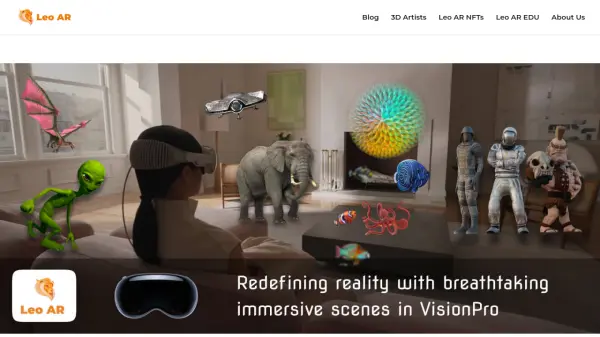
Leo AR is an augmented reality app that empowers users to become architects of their own reality. By simply pointing their device's camera, users can instantly access a vast library of thousands of 3D objects and effects to create immersive AR videos. Whether it's swimming with sharks, flying with unicorns, or traveling to space, Leo AR makes it possible in just a few seconds.
Designed for creativity and fun, Leo AR leverages ARKit and ARCore technologies to deliver a seamless and realistic augmented reality experience. Users can shoot, create, and share their AR videos with the community, making every moment more exciting and imaginative.
Features
- Vast 3D Library: Access to thousands of realistic and artistic 3D objects to enhance videos.
- Easy AR Creation: Simply point, shoot, and create AR videos in seconds.
- AR Video Sharing: Share creations with the Leo AR community on social media.
- ARKit & ARCore Support: Utilizes advanced AR frameworks for realistic effects.
- Fun and Creative Effects: Add sharks, unicorns, space travel, and more to any scene.
Use Cases
- Creating entertaining AR videos for social media.
- Enhancing educational content with interactive 3D models.
- Adding fun elements to personal videos and vlogs.
- Exploring creative storytelling through augmented reality.
- Engaging audiences with immersive marketing content.
FAQs
-
Is Leo AR free to use?
Leo AR offers a free version with basic features. There may be in-app purchases or subscription options for additional content. -
What platforms is Leo AR available on?
Leo AR is available on iOS and Android devices that support ARKit and ARCore. -
Can I use my own 3D models in Leo AR?
The app provides a library of 3D objects. Custom 3D model uploads may not be supported as per the available information. -
How do I share videos created with Leo AR?
Videos can be directly shared to social media platforms like Instagram and others from within the app. -
Does Leo AR require an internet connection?
An internet connection is likely needed to access the 3D object library and share videos.