What is Langdesk?
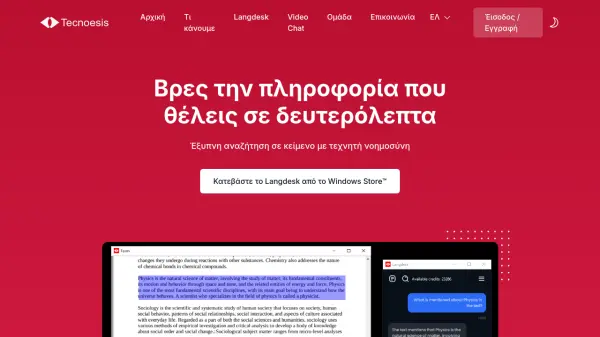
Langdesk provides an intelligent search solution that utilizes artificial intelligence to help users find information and answers within their documents. The tool supports semantic search in natural language, powered by language models, allowing users to query their text files efficiently.
It offers two operational modes: a completely free local language model mode for maximum security and offline functionality, and an online language model mode for faster performance with usage-based payment. The platform also extends its capabilities to YouTube videos through Video Chat, enabling users to ask questions and receive answers based on video content. All documents remain on the user's computer during processing, ensuring data privacy without online storage.
Features
- AI-Powered Search: Semantic search in natural language using language models
- Data Protection: Documents remain on your computer without online storage during processing
- Offline Capability: Local language model operation without internet connection
- Multiple File Types: Search across various text file formats
- YouTube Integration: Ask questions and get answers based on YouTube video content
- Dual Operation Modes: Choose between free local model or faster online model with usage-based pricing
Use Cases
- Searching for specific information within large document collections
- Analyzing YouTube video content through natural language queries
- Conducting research across multiple text documents
- Finding answers in business documents without manual scanning
- Working with sensitive documents that require offline processing
- Improving team productivity through intelligent document search
FAQs
-
What types of files can Langdesk search through?
Langdesk supports search across various text file formats, though specific formats aren't listed in the provided content. -
How does the YouTube Video Chat feature work?
The Video Chat feature allows users to ask questions and receive answers based on the content of YouTube videos. -
What happens to my documents during processing?
Documents remain on your computer and are not stored online during processing to ensure data privacy. -
What are the differences between local and online model modes?
Local model mode is completely free, offers maximum security and works offline, while online model mode provides faster performance with usage-based pricing. -
Is there a free version available?
Yes, the local language model mode is completely free, and the online model provides 600 credits free upon account creation.