What is Hamster Tools?
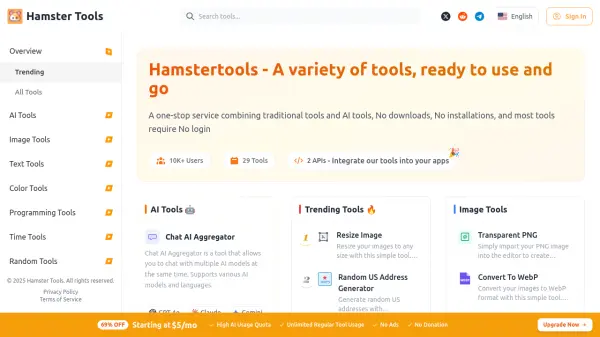
Hamster Tools provides a versatile online platform featuring a wide array of tools accessible directly through a web browser. It positions itself as a convenient one-stop service by combining traditional web utilities with advanced AI capabilities, eliminating the need for downloads or installations for most functionalities.
The platform includes an AI Chat Aggregator that allows users to interact simultaneously with multiple AI models such as GPT-4o, Claude, Gemini, and Deepseek. Beyond AI, it offers comprehensive Image Tools for resizing, format conversion (WebP, PNG, JPG), cropping, background removal (transparent PNG), flipping, inverting colors, splitting, and merging images, along with a color picker. Text Tools facilitate tasks like removing line breaks, finding and replacing text, counting sentences/words/letters, and converting text case. Additionally, Hamster Tools provides Programming Tools like a JSON Formatter, Time Tools for calculating date differences and a stopwatch, various Random Tools (address, password, object generators, list randomizer, dice roller), and Device Tools including an online Screen Recorder.
Features
- AI Chat Aggregator: Chat with multiple AI models (GPT-4o, Claude, Gemini, Deepseek) simultaneously.
- Comprehensive Image Tools: Resize, convert (WebP, PNG, JPG), crop, make transparent, flip, invert, split, merge images, and pick colors.
- Text Processing Utilities: Remove line breaks, find/replace text, count sentences/words/letters, and convert text case.
- Random Generators: Create random US/Canada addresses, passwords, objects, randomize lists, and roll dice.
- Web-Based Access: No downloads or installations required for most tools.
- Screen Recorder: Record screen activity directly online.
- Programming & Time Tools: Includes JSON Formatter, Date Time Difference calculator, and Stopwatch.
Use Cases
- Aggregating responses from multiple AI chatbots.
- Performing quick image edits like resizing, format conversion, or background removal.
- Cleaning and manipulating text data (e.g., removing line breaks, changing case).
- Generating random data like passwords or addresses for testing or other purposes.
- Formatting JSON code for readability.
- Calculating time differences or timing activities.
- Recording screen sessions for tutorials or bug reports.
- Using utility tools without installing software.