What is Freelance Spreadsheets?
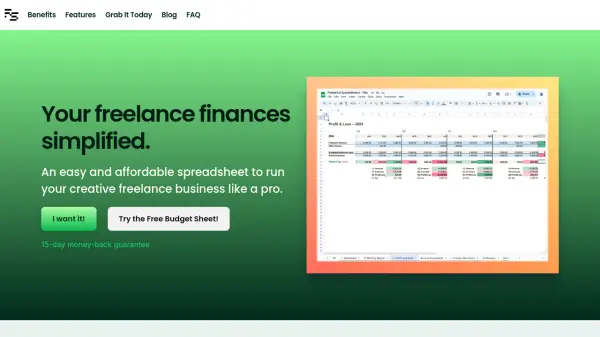
Freelance Spreadsheets is designed for creative freelancers seeking a straightforward and affordable approach to managing their business finances. This solution provides user-friendly spreadsheet templates within Google Sheets, allowing users to efficiently track budgets, monitor profit and loss, project future income, and calculate service pricing. Its startup-friendly dashboards and auto-updating charts deliver relevant business insights without requiring advanced financial knowledge.
Users benefit from a quick setup process and clear, jargon-free language, ensuring efficient financial management for those selling time-based creative services. The tool eliminates recurring subscription fees, offering all functionalities for a one-time, accessible price. Included resources like a business glossary and price calculators further enable freelancers to run their businesses with confidence and clarity.
Features
- Dashboard: Auto-updating charts, graphs, and business statistics.
- Monthly Budget: Track and analyze expenses and liabilities.
- Profit & Loss: Visualize and assess financial performance over time.
- Projections: Forecast the upcoming two months of finances.
- Price Calculators: Generate pricing recommendations based on job parameters.
- Glossary: Reference for business and financial terminology.
- Quick Setup: Guided initialization and easy adjustment of spreadsheet parameters.
- Google Sheets Integration: Easy access and familiarity for most users.
Use Cases
- Track and manage freelance business finances with ease.
- Compare projected income and expenses for better planning.
- Analyze monthly profit and loss to assess business health.
- Determine competitive and profitable pricing for services.
- Set up a clear budget and monitor spending categories.
- Use financial insights to make informed business decisions.
FAQs
-
Can I try Freelance Spreadsheets before buying?
Yes, a free budget sheet is available for users to experience the basic features before purchasing the complete suite. -
Do I need prior experience with Excel or Google Sheets?
No, the templates are designed for ease of use and include quick setup guidance, suitable even for those with minimal spreadsheet experience. -
Are updates included after purchase?
Yes, free updates are provided for one year following purchase. -
What support is available if I encounter issues?
Email support is included with both the free and paid versions for resolving any queries or technical difficulties. -
Is there a money-back guarantee?
Yes, a 15-day money-back guarantee is offered on the full version.