What is eqMac?
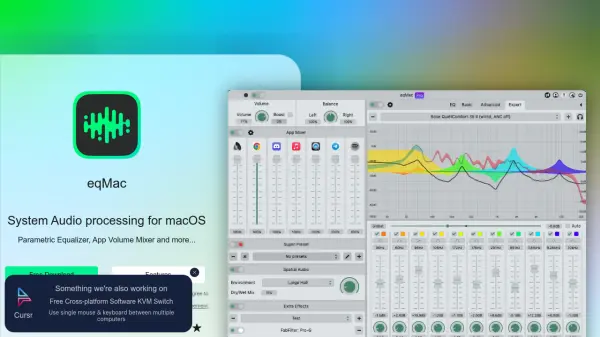
eqMac provides system-wide audio processing capabilities for macOS users, enabling precise control over audio output through various equalization options and mixing features. The tool supports all audio devices including built-in, Bluetooth, AirPlay, USB, HDMI, and more, allowing users to customize their audio experience across different hardware.
With features ranging from basic bass/mids/treble adjustments to expert-level parametric equalization with unlimited bands, eqMac caters to both casual listeners and audio professionals. The platform includes spatial audio simulation, headphone presets for thousands of models, and the ability to host Audio Units for extended functionality.
Features
- Parametric Equalizer: Unlimited bands with adjustable gain, bandwidth, frequency, and multiple filter types
- App Volume Mixer: Adjust volume per application across the entire system
- Headphone Presets: Reference presets for over 4600 different headphone models
- Spatial Audio: Simulates different listening environments for enhanced audio experience
- Audio Unit Hosting: Chain favorite Audio Units from your library with eqMac effects
Use Cases
- Enhancing audio quality for music listening on macOS
- Adjusting application-specific volume levels for better audio mixing
- Creating custom equalization profiles for different headphones
- Simulating spatial audio effects for immersive listening experiences
- Recording adjusted audio to MP3 files with applied effects
FAQs
-
What macOS versions does eqMac support?
eqMac supports macOS 10.13+ on both Intel and Apple Silicon processors. -
Does eqMac work with Bluetooth headphones?
Yes, eqMac supports all audio devices including Bluetooth, AirPlay, USB, HDMI, DisplayPort, and built-in audio. -
Can I control eqMac from my mobile device?
Yes, the Pro version includes remote control functionality for iOS, iPadOS, and Android devices on the same local network. -
Does eqMac offer cloud synchronization?
Yes, the Pro version includes cloud sync to save presets and settings across devices. -
Can I record audio with eqMac effects applied?
Yes, eqMac offers recording functionality to save adjusted audio to MP3 files.