What is Epicflow?
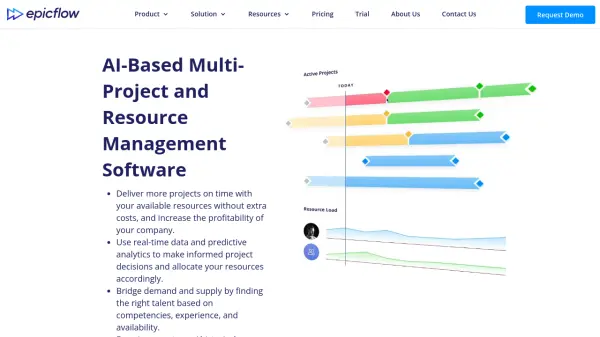
Epicflow leverages artificial intelligence and predictive analytics to transform multi-project and resource management. The platform utilizes machine learning algorithms to automatically plan and schedule tasks, prioritize projects based on real-time data, and detect workflow bottlenecks through AI-driven simulations. It provides semi-automated resource allocation by matching team members' competencies, attributes, capacity, and availability with project demands.
The software offers comprehensive tools like AI Assistant for project updates, What-If Analysis for scenario testing, Future Load Graph for predicting resource demand, and Historical Load Graph for analyzing past performance. These features enable organizations to balance workloads, prevent resource conflicts, and make informed decisions to increase project delivery efficiency and company profitability.
Features
- AI Assistant: Provides AI-powered assistance to stay updated on project changes and optimize decision-making
- What-If Analysis: Enables testing of project changes to predict bottlenecks and allocate resources accordingly
- Future Load Graph: Predicts resource demand and output while analyzing resource load to detect future bottlenecks
- Historical Load Graph: Analyzes past resource workload and performance data to improve future efficiency
- Competence Management: Bridges demand and supply by matching resources to tasks based on competencies, experience, and availability
- Pipeline: Provides real-time overview of the entire multi-project environment with change-sensitive prioritization
- Task List: Focuses on important project parts with automatically calculated priorities using machine learning algorithms
- Integration Capabilities: Offers ready-made integrations with Jira, MS Project, and Oracle Primavera
Use Cases
- Optimizing resource allocation across multiple simultaneous projects
- Predicting and preventing workflow bottlenecks in project environments
- Balancing team workloads to maximize employee productivity
- Testing different project scenarios to choose the best execution strategy
- Analyzing historical performance data to improve future project planning
- Managing project portfolios with real-time change-sensitive prioritization
- Matching team competencies with project demands for optimal task assignment
- Forecasting resource capacity and demand for better planning decisions