Dictate Buddy favicon

Dictate Buddy
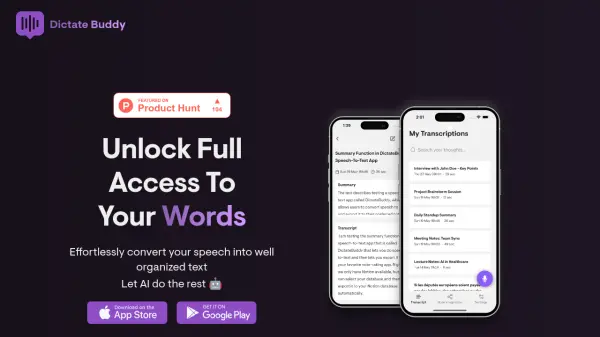
Effortlessly convert your speech into well-organized text

What is Dictate Buddy?

Dictate Buddy is a cutting-edge speech-to-text conversion application that leverages the OpenAI Whisper model to deliver accurate transcriptions with proper punctuation. The app stands out for its unlimited recording capability and seamless integration with Notion, allowing users to automatically export transcriptions to their preferred databases.

The application offers comprehensive language support, automatically detecting and transcribing content in 99 different languages. With features like automatic summarization, Dictate Buddy helps users quickly capture key points from their recordings without the need to review lengthy transcripts, making it an efficient tool for various professional and personal use cases.

Features

  • Unlimited Recording: No time restrictions for lengthy sessions
  • Language Support: Automatic detection of 99 languages
  • Notion Integration: Direct export to Notion databases
  • Automatic Summarization: Generate quick summaries of transcriptions
  • AI-Powered Transcription: Uses OpenAI Whisper model for accurate results

Use Cases

  • Meeting transcription
  • Interview documentation
  • Brainstorming sessions
  • Content creation
  • Note-taking
  • Language learning
  • Academic lectures

FAQs

  • How many languages does Dictate Buddy support?
    Dictate Buddy supports 99 languages with automatic language detection capability.
  • Is there a time limit for recordings?
    No, Dictate Buddy offers unlimited recording time with no restrictions.
  • Can I export my transcriptions to Notion?
    Yes, you can connect your Notion account and automatically export transcriptions to your chosen database.

Helpful for people in the following professions

Related Tools:

Blogs:

  • Top 6 AI note-taking tools for 2026: in-person, online, and hybrid use cases

    Top 6 AI note-taking tools for 2026: in-person, online, and hybrid use cases

    Most AI note-taking lists are really lists of meeting bots, which join your video call and transcribe it. That's useful, but it's half the picture. Decisions happen in hallway conversations, client dinners, on-site visits, and hybrid rooms where nobody is on a video link. This guide covers different parts of the note-taking workflow: hardware capture for in-person settings, platform-native tools for online calls, and AI layers for organizing and synthesizing what you've captured. It compares six tools by capture context, workflow fit, pricing, and limitations.

  • Best ai tools for Twitter Growth

    Best ai tools for Twitter Growth

    The best AI tools for Twitter's growth are designed to enhance user engagement, increase followers, and optimize content strategy on the platform. These tools utilize artificial intelligence algorithms to analyze Twitter trends, identify relevant hashtags, suggest optimal posting times, and even curate personalized content.

  • Best Content Automation AI tools

    Best Content Automation AI tools

    Streamline your content creation process, enhance productivity, and elevate the quality of your output effortlessly. Harness the power of cutting-edge automation technology for unparalleled results

Didn't find tool you were looking for?

Be as detailed as possible for better results