cursor.directory favicon

cursor.directory
The Home for Cursor Enthusiasts

What is cursor.directory?

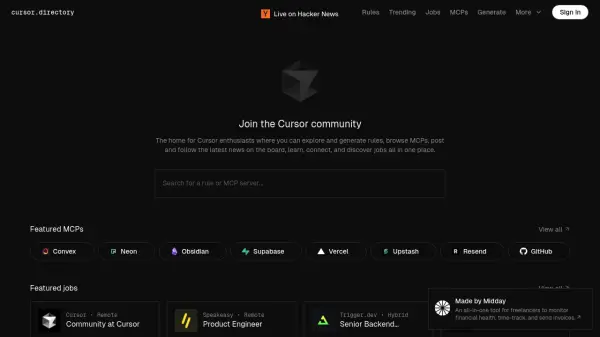
Cursor.directory is a dedicated platform designed for the Cursor community. It serves as a central hub where users can engage with various aspects of Cursor, including exploring and generating rules and browsing MCP servers.

The platform also features a job board and a news section, allowing users to connect with career opportunities and stay informed about the latest developments in the Cursor ecosystem. It promotes learning, connection, and discovery among Cursor enthusiasts.

Features

  • Featured MCPs: View a curated list of popular MCP servers.
  • Featured Jobs: Browse job opportunities related to Cursor.
  • Rules Search: Search for specific rules or MCP servers.
  • News Board: Stay updated on the latest Cursor news.

Use Cases

  • Finding Cursor-related job opportunities.
  • Sharing and discovering Cursor rules.
  • Exploring and connecting to MCP servers.
  • Staying informed about Cursor updates and news.

Related Tools:

Blogs:

  • Long Videos into Viral Shorts

    Long Videos into Viral Shorts

    Klap.app is an AI-powered video editing tool that transforms long-form videos into engaging short clips optimized for platforms like TikTok, Instagram Reels, and YouTube Shorts

  • Best AI tools for recruiters

    Best AI tools for recruiters

    These tools use advanced algorithms and machine learning to automate tasks such as resume screening, candidate matching, and predictive analytics. By analyzing vast amounts of data quickly and efficiently, AI tools help recruiters make data-driven decisions, save time, and identify the best candidates for open positions.

  • Top 6 AI note-taking tools for 2026: in-person, online, and hybrid use cases

    Top 6 AI note-taking tools for 2026: in-person, online, and hybrid use cases

    Most AI note-taking lists are really lists of meeting bots, which join your video call and transcribe it. That's useful, but it's half the picture. Decisions happen in hallway conversations, client dinners, on-site visits, and hybrid rooms where nobody is on a video link. This guide covers different parts of the note-taking workflow: hardware capture for in-person settings, platform-native tools for online calls, and AI layers for organizing and synthesizing what you've captured. It compares six tools by capture context, workflow fit, pricing, and limitations.

Didn't find tool you were looking for?

Be as detailed as possible for better results