What is CONTROLLINO AI?
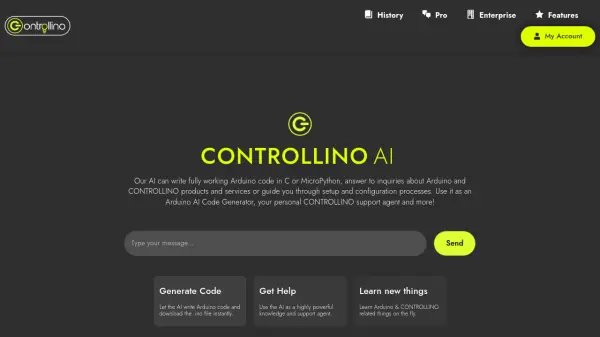
CONTROLLINO AI is an advanced tool designed to assist users with Arduino and CONTROLLINO projects. It leverages powerful AI models like GPT-4o Mini, GPT-4o, and Claude 3.5 Sonnet to generate fully functional Arduino code in C or MicroPython. Users can instantly download the generated code as a .ino file.
Beyond code generation, the tool serves as a comprehensive knowledge base and support agent. It can answer questions about Arduino and CONTROLLINO products and services, provide guidance on setup and configuration processes, and help users learn new concepts related to these platforms. Depending on the plan, it offers features like vision support for analyzing images and documents (e.g., wiring diagrams, datasheets) and adherence to C++ safety standards.
Features
- AI Code Generation: Writes functional Arduino code in C or MicroPython, downloadable as .ino files.
- Multiple AI Models: Utilizes models like GPT-4o Mini, GPT-4o, and Claude 3.5 Sonnet for varying levels of complexity and speed.
- Knowledge & Support Agent: Answers questions about Arduino/CONTROLLINO products, services, setup, and configuration.
- Vision Support (Pro/Enterprise): Processes images and documents like wiring diagrams and datasheets.
- Code Safety Standards (Pro/Enterprise): Generates code based on SEI CERT C++, MISRA, and other standards.
- Custom Coding Standards (Pro/Enterprise): Adheres to user-defined coding guidelines upon request.
- Variable Context Length: Supports text lengths from 4,000 to 128,000 tokens depending on the plan.
- Conversation History (Pro/Enterprise): Retains previous conversations for context.
- Microcontroller Specialization: Trained on various microcontrollers including Arduino, CONTROLLINO, ESP32, Raspberry Pi Pico, STM32, etc. (enhanced in paid plans).
Use Cases
- Generating Arduino code for projects.
- Getting support for CONTROLLINO products and services.
- Learning Arduino and microcontroller programming.
- Troubleshooting setup and configuration issues.
- Analyzing wiring diagrams or datasheets (with Vision Support).
- Ensuring code adheres to specific safety or custom standards.
FAQs
-
What AI models does CONTROLLINO AI use?
CONTROLLINO AI utilizes GPT-4o Mini, GPT-4o, and Claude 3.5 Sonnet, with model availability depending on the selected subscription plan (Starter, Pro, or Enterprise). -
Can I upload images or documents to the AI?
Yes, the Pro and Enterprise plans include Vision Support, allowing you to upload images and documents like wiring diagrams and datasheets for analysis by the AI. -
Is there a limit on the number of messages I can send?
The free Starter plan is limited to 30 messages per month. The Pro and Enterprise plans offer unlimited messages. -
Does CONTROLLINO AI support microcontrollers other than Arduino?
Yes, while trained on Arduino & CONTROLLINO, the Pro and Enterprise plans offer specialized knowledge of other devices like ESP32, ESP8266, Raspberry Pi Pico, STM32, Teensy, Adafruit Feather, Nucleo, and more. -
Can the AI generate code following specific safety standards?
Yes, the Pro and Enterprise plans can generate code based on C++ safety standards such as SEI CERT C++, MISRA, and others for maximum safety.