ColorBox favicon

ColorBox
Smart Color Palette Generation with Algorithmic Precision

What is ColorBox?

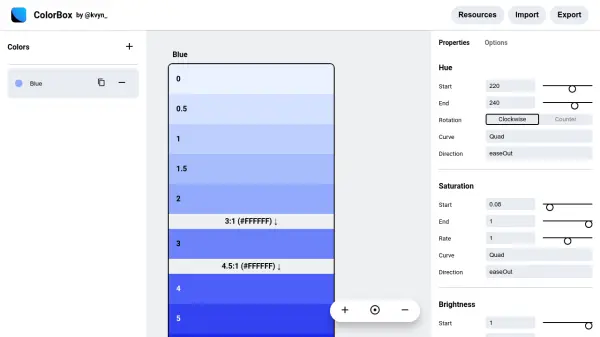
ColorBox is an intelligent tool designed to generate versatile and customizable color palettes using dynamic algorithms. It empowers users to fine-tune hue, saturation, and brightness parameters while exploring a visually intuitive color scale for professional design applications.

Featuring advanced options such as curve manipulation, minor and major step adjustments, and dark mode capabilities, ColorBox streamlines the palette creation process for Figma users and beyond. Its export and import functionality enhances collaboration, making it a valuable resource for creative teams aiming for design consistency and innovation.

Features

  • Algorithmic Color Palette Generation: Customizable logic for hue, saturation, and brightness
  • Curve Manipulation: Fine-tune color transitions with multiple curve settings
  • Step Control: Choose major and minor steps for color range precision
  • Dark Mode Generation: Create linked or editable inverted palettes
  • Export/Import: Boosts collaboration and workflow integration
  • Figma Plugin Integration: Seamless use in design environment

Use Cases

  • User interface color palette creation
  • Branding and visual identity design
  • Design system development
  • Theme generation for applications
  • Accessible color scaling for digital products

Related Tools:

Blogs:

  • AI tools for video voice overs

    AI tools for video voice overs

    Discover the next level of video production with AI-powered voiceover tools. Enhance your content effortlessly, ensuring professional-quality narration for your videos.

  • Top 6 AI note-taking tools for 2026: in-person, online, and hybrid use cases

    Top 6 AI note-taking tools for 2026: in-person, online, and hybrid use cases

    Most AI note-taking lists are really lists of meeting bots, which join your video call and transcribe it. That's useful, but it's half the picture. Decisions happen in hallway conversations, client dinners, on-site visits, and hybrid rooms where nobody is on a video link. This guide covers different parts of the note-taking workflow: hardware capture for in-person settings, platform-native tools for online calls, and AI layers for organizing and synthesizing what you've captured. It compares six tools by capture context, workflow fit, pricing, and limitations.

  • Best AI tools for trip planning

    Best AI tools for trip planning

    These tools analyze user preferences, budget constraints, and destination details to provide personalized itineraries, suggest optimal routes, recommend accommodations, and even offer real-time updates on weather and local events.

Didn't find tool you were looking for?

Be as detailed as possible for better results